IRS Electronic Tax Payments: A Quick Guide for Individuals & Businesses
Federal taxes will be due in a couple months and now is a great time to get started, even though you probably won’t have your paperwork ready since most employers won’t send out W-2s until the end of the month. The good news is that you can easily set up an account to pay electronically with the IRS. But it’s best to start early because it can take two weeks to complete the process because you need to receive a PIN from the IRS. I did this a few days ago to make it easier to pay my federal taxes.
Why you should pay your taxes electronically
Paying your taxes electronically is the fastest, easiest, and safest way to pay your taxes. The IRS will give you confirmation of receiving your tax return within 48 hours, and you e-filing also makes it quicker for them to process your return, which means a faster refund for you if you overpaid your taxes. These are just a few of the benefits of electronically filing your tax return.
Great for individual taxes and businesses
I recently met with my accountant to do some end of year tax planning, which included changing the way my business is taxed. I am now paying myself a standard paycheck and filing a W-2 at the end of the year, which means not only do I have to pay estimated taxes 4 times per year, but I will have to pay the other payroll taxes on a quarterly basis, including federal income tax, state income tax, FICA (Social Security and Medicare), and state and federal unemployment taxes. State and federal taxes are separate from each other, and I will be paying my state taxes via check. But it’s easy to pay your federal taxes electronically through the Electronic Federal Tax Payment System (EFTPS).
How to set up an Electronic Federal Tax Payment System (EFTPS) account
With all the benefits of electronic payments, it’s almost a no-brainer to sign up. Thankfully, setup and execution are easy (the entire process should take less than 10 minutes). Before you start you will need to gather your financial information including your Taxpayer Identification Number (SSN for personal taxes, or EIN for business), and bank account and routing number. Don’t forget your spouse’s SSN if you file jointly.
After you gather your information, head over to the EFTPS website and click the button to open a new account. Once there you have the option of creating a business or personal account.
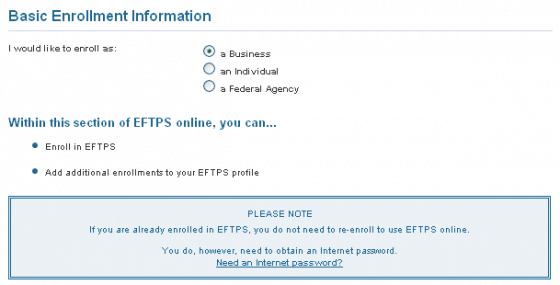
Enter your personal/business information. The next step is to enter your SSN or EIN, your name or business name, and your contact information, including your address and phone number. Individual taxpayers will enter their information on one page, and have the option of adding a joint taxpayer such as their spouse. Businesses will use a two page process, which is essentially the same.
Select payment option (business enrollments only). Your next step is to select which payment method you wish to enroll in: Standard EFTPS Enrollment or Financial Institution Tax Payment Service. The standard EFTPS enrollment allows you to initiate tax payments through EFTPS online or by phone and takes a debit from your bank account. It is the only option available to individuals.
EFTPS-Through A Financial Institution is only available to business taxpayers and works by the business initiating payment through the financial institution (note: not all financial institutions offer this method, so check with your bank before selecting this option).
Optional: Tax Form Payment Amount Limits. This next step is optional and allows you to set payment limits for certain tax forms so you don’t overpay. This will not be applicable to everyone and I left it blank for my situation. Be sure to check with your tax advisor for more information (and you can always make changes later).
Financial Institution Information. Next you enter your bank account information, including account number, routing number, and account type (checking or savings). Your routing number is the 9 digit number on your checks. Contact your bank if you cannot find this information.
Verify enrollment data and provide authorization. After you input your data you have the opportunity to go back and make changes. Once you verify your information is correct, then click next and provide authorization for the IRS to make electronic withdrawals from your account.
Important – print or save your information! Once you fill out everything you will be notified that your enrollment is complete and you will receive an enrollment trace number, which is required if you need to contact the IRS regarding your enrollment. Within 15 business days you should receive a packet from the IRS containing more information, including your Personal Identification Number (PIN), a confirmation form with your information, and instructions on how to obtain your internet password, which you will need before you can make online payments. You will want to store this information in a secure location!
Make payments online or via phone
Once you complete your enrollment and receive your PIN and internet password, you can make payments online or over the phone. The IRS also supports TDD/TTY (for hearing impaired).
Note: Sign up well before your payments are due because it can take up to 15 days to receive your PIN!



budget
- Find the Right Business Insurance Broker: A Step-by-Step Guide
- 1099 Tax Filing Guide for Independent Contractors | [Year]
- Boost Business Growth: Strategies for Repeat Customer Loyalty
- Free Online Tax Filing: A Simple Guide for 2024
- Securing Business Financing: A Comprehensive Preparation Guide
- Small Business Grants: A Comprehensive Guide to Funding Your Growth
- 2019 Tax Season Prep: Smart Financial Strategies for a Smooth Filing
- E-commerce Accounting: Essential Concepts for Online Businesses
- Business Structures & Taxes: Choosing the Right Legal Structure