
TaxAct Review 2019: Comprehensive Tax Software for Individuals & Businesses
TaxAct is one of the leading tax preparation software packages available. The service was founded in 1998, and it enables you to prepare all types of returns, regardless of the degree of difficulty.
Small and medium-size business tax returns are a niche of this product, but they even have a professional edition available for career tax preparers.
Why Choose TaxAct to File Your Tax Return?
Like most tax software programs, you can file a free, basic federal tax return with TaxAct (Form 1040A and Form 1040EZ only).
But TaxAct also excels if you have a more complicated tax return, including taxpayers who have income from real estate rentals, investment income, freelancing, consulting, a small business, 1099 income, or similar situations.
TaxAct offers some real advantages that make it well worth investigating:
TaxAct generally costs less than competing packages. The difference isn’t dramatic, but they tend to be less expensive across-the-board. And, since your return is guaranteed, you can feel comfortable using software offering the best pricing, so long as it meets your needs.
TaxAct provides free technical phone support. More common in the industry is to provide library-type content, where you can look up specific tax questions in the database. But, given that most people don’t prepare taxes for a living, being able to talk to a live person can be reassuring. It’s especially comforting if you’re preparing taxes online for the first time.
TaxAct comes with a Price Lock Guarantee. You will get the price for the plan you select, regardless of when you actually file your return. Lock in your price now, and it will be good until you file your tax return. This is an important feature, since many tax prep plans increase their prices closer to April 15. Purchase TaxAct now to ensure that doesn’t happen.
TaxAct pledges an Accuracy Guarantee. TaxAct Alerts inspects your return for errors and omissions that could increase your chance of being audited. It also finds opportunities for tax saving you may have missed.
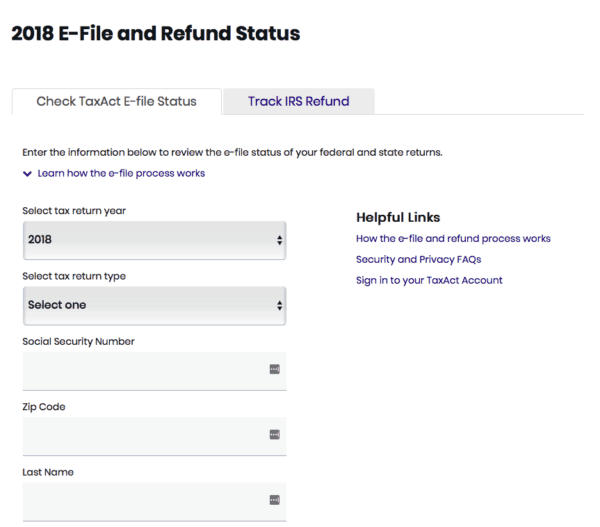
TaxAct offers Tax Refund Status tracking. When you file online, they provide you with easy access to track when your e-filed tax return has been received by the IRS, as well as the anticipated date of your refund. Here is a screenshot of the TaxAct tax refund status tool. It’s easy to use: simply enter your information, click enter, and TaxAct will give you a status update on your tax refund.
TaxAct Features and Benefits
Some of the additional features and benefits provided by TaxAct include:
- TaxTutor Guidance. This tool provides easy-to-follow, expert tax tips and strategies. They will help provide the biggest money-saving deductions.
- TaxAct Bookmarks. This tool enables you to mark a spot in your Questions & Answers so you can return to that section anytime you like.
- FAFSA Assistance. Got a student in the family who will need to apply for a government loan or assistance? TaxAct’s FAFSA Assistance can help with that. It enables you to prepare and print a worksheet with the tax information needed to obtain federal financial aid.
- Complete Tax Glossary. You can get definitions for almost 300 tax terms, linked directly from the TaxAct interview process anytime you need them.
- Personalized Healthcare and Tax Reports. This tool enables you to maximize future tax and healthcare savings with personal strategies and tips.
- Personalized Financial BluPrint. This is a complimentary financial report provided after you file your return. It provides financial planning and tax-saving opportunities based on the information in your tax return.
- Tax Extensions. You can use TaxAct to file a free tax deadline extension (learn more about tax deadline extensions).
- Audit Defense. In partnership with Protection Plus, TaxAct offers a full-service Audit Defense service you can choose to enroll in when filing federal and state returns. Your tax return is also covered for three years and backed with a $100,000 Accuracy Guarantee.
Options for Receiving Your Tax Refund with TaxAct
Tax filers who use TaxAct can choose to receive their tax refund via direct deposit to their bank account, or via a check from the IRS. You can also apply your refund to future tax payments.
Finally, tax filers can choose to receive their tax refund on an American Express Serve Prepaid debit card. The latter is a good option for those who do not have access to a bank and want to avoid paying check cashing fees.
TaxAct Software Versions, Features, and Pricing
Like other popular tax software programs, TaxAct offers several different versions.
No matter which version you choose, all TaxAct products come with free account support, a maximum refund guarantee, 7 years of access to your return, easy W-2 import, a personalized BluPrint financial assessment, and a $100,000 accuracy guarantee.
TaxAct Free Online/Downloadable Version – $0 for Federal and State
The free version enables you to file either 1040 EZ or 1040A forms at no cost to you.
This version is of course only for the simplest tax returns, including retirement income. But, it provides all the basic preparation options available with premium versions, such as the preparation, printing, and e-filing of your return.
You will be kept apprised of your refund or the amount due as you prepare your tax return.
- Check out the TaxAct Free version for more information.
TaxAct Basic+ Online Version – $14.95 for Federal + $19.95 per State
With the Basic+ version, users can conveniently import prior year tax return information. This software includes all features of TaxAct’s Free version plus unlimited tax specialist support.
The downloadable Basic software is $24.95, which includes 5 federal e-files. TaxAct charges $39.95 per state.
TaxAct Deluxe+ Online Version – $47.95 Federal + $39.95 per State
The Deluxe+ Version is suited for moderately complicated returns, including those who itemize tax deductions, own a home, have student loan interest, or take advantage of certain tax credits or adjustments.
This software includes all features of TaxAct’s Basic+ version, along with a few more bells and whistles.
Filers can easily import personal data from last year’s tax return and even prior years information from TurboTax and H&R Block.* In addition, you can track charitable donations with Donation Assistant and receive FAFSA Assistance.
It also enables you to monitor refund amount updates in real-time while preparing your tax return online. Unlike the other versions, unlimited tax specialist support via phone is provided.
The downloadable Deluxe software is $87.90, which includes 5 federal e-files and 1 state return.
*Note about changing tax software programs: most top-tier tax software programs can import your previous tax returns, even if you are using a different software program (Note: there may be a fee to import previous tax returns). That being said, it’s a good idea to maintain copies of your tax records for at least 7 years. These tips are helpful for organizing your tax paperwork.
- Visit the TaxAct website for more information about TaxAct Deluxe+.
TaxAct Premier+ Online Version – $57.95 Federal + $39.95 per State
This version, highly recommended by TaxAct itself, is perfect for filers with investment income expenses or rental property.
In fact, Premier+ is one of the most reasonably priced plans for owners of rental properties among all tax prep services.
Unlike the other versions, Premier+ includes access to a dedicated phone line, along with screen share capabilities.
The downloadable Premier software is $97.90, which includes 5 federal e-files and 1 state return.
- Learn more about TaxAct Premier+.
TaxAct Self-Employed+ Online Version – $77.95 + $39.95 per State
This is the TaxAct plan for the self-employed, including freelancers, independent contractors, and small business owners. It’s even an excellent plan for investors. Essentially, Self-Employed+ includes all features of the Premier+ software, and some.
Self-Employed+ also comes with the Deduction Maximizer tool. It’s a simple tool designed specifically for the self-employed, enabling one to take advantage of the deductions most commonly claimed by those in your line of business.
The downloadable Self-Employed software is $117.90, which includes 5 federal e-files and 1 state return.
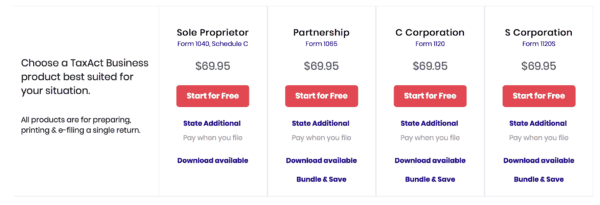
If you have a partnership, an LLC, and either a C or S corporation, the fee for the program is higher, at $69.95.
This includes filing Form 1040, Schedule C (sole proprietor), Form 1065 (partnership or LLC), Form 1120 (C Corporation) or Form 1120S (S corporation) for your business, as well as your individual 1040.
- See if the TaxAct Self-Employed+ version is right for you.

Should You Use TaxAct to Prepare Your Income Taxes this Year?
The major advantage of using TaxAct is that the plans cost less than comparable tax preparation programs.
TaxAct’s plans fulfill virtually the same services as more expensive providers, just at a lower cost. TaxAct may have fewer bells and whistles than other plans, though.
For example, TurboTax integrates with QuickBooks Self-Employed, while TaxAct has no equivalent offering.
But, for most people in most tax-filing situations, TaxAct will enable you to get the job done and do it at minimal cost.
For those interested, TaxAct’s Tax Calculator, Tax Bracket Calculator, and Self-Employment Calculator are free, easy-to-use online tools to take advantage of in preparation for tax season.
To learn more or to purchase software, visit TaxAct’s website.

-

Q1 2019 Market Review: Analysis & Outlook | Personal Capital
Personal Capital’s Chief Investment Officer, Craig Birk, breaks down the major events in the financial markets in Q1 of 2019. These are excerpts from our full Q1 2019 Market Review & Comment
-
Maximize Your Savings: 5 Smart Tax Strategies for 2019
Tax season sneaking up on you? Read our complete guide to filing your income taxes. As we near April 15th, taxes are top of mind for many of us. While 2018 has come and gone, there is plenty of time t
budget
- February 2019 Capital Markets Review: Performance & Key Trends
- Top Tax Software Programs for 2024: Compare & Save
- TurboTax Review 2024: Is It the Best DIY Tax Software for Your Taxes?
- Tax Diversification for Retirement: Protect Your Savings
- Tax Software Review: Simplify & File Your Taxes Quickly
- Best TurboTax Alternatives: Comprehensive Tax Software Comparison (2024)
- Liberty Tax Review: Is it Right for You? - Simplified Tax Filing
- 2019 Tax Return Filing Trends: State-Level Impact & Refund Delays
- TaxAct vs. FreeTaxUSA: A Comprehensive Comparison (2024)
-
 2019 Stock Market Review: Key Trends & Headlines
At the end of June, we wrote about the five biggest catalysts facing the stock market in the second half of 2019. Well, it turns out we were half right. The top two items on that list—the trade war...
-
 H&R Block Review: Simplifying Your Tax Return in a Complex World
I frequently go on record saying, “I don’t mind paying taxes—I just wish they weren’t so complicated!” And I mean every word of that. I understand the important role tax revenues pla...