
YNAB Theme Updates: New Design & Enhanced Features
Have you opened your budget on your computer lately and done a double-take?
You might be asking yourself, “wow budget, when did you get so fly? Is it just me, or are you looking reallllly good these days?”
The YNAB web app/desktop version has a few new features to flaunt:
- Theme picker
- New default theme (cleaner, easier on the eyes, and more readable)
- Dark mode
- Collapsible sidebar on desktop
Note: the default theme and dark mode were already available on mobile, this update just brings these features to the desktop/web app view.
Tell me more, tell me more!
Choose Your Theme
Choose between three viewing options for your budget with the theme picker, and change your mind anytime. Pick from:
- Default
- Dark mode
- Classic
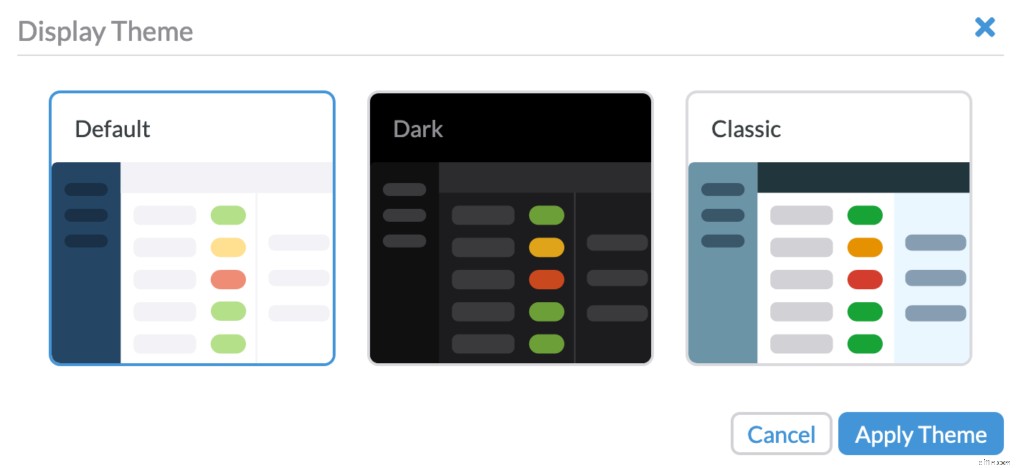
And here’s how to find the theme picker on the web app:
New Default Theme Makes Your Budget More Readable
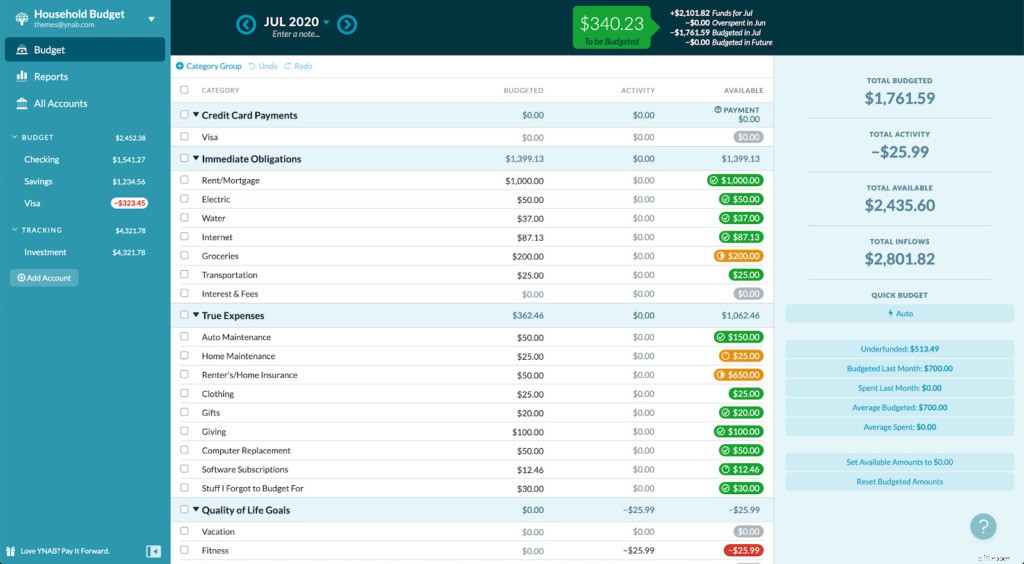
We’ve changed the colors to make it easier than ever to see your budget. Here’s what the classic version of the budget looks like:
And here’s what the new default theme looks like:
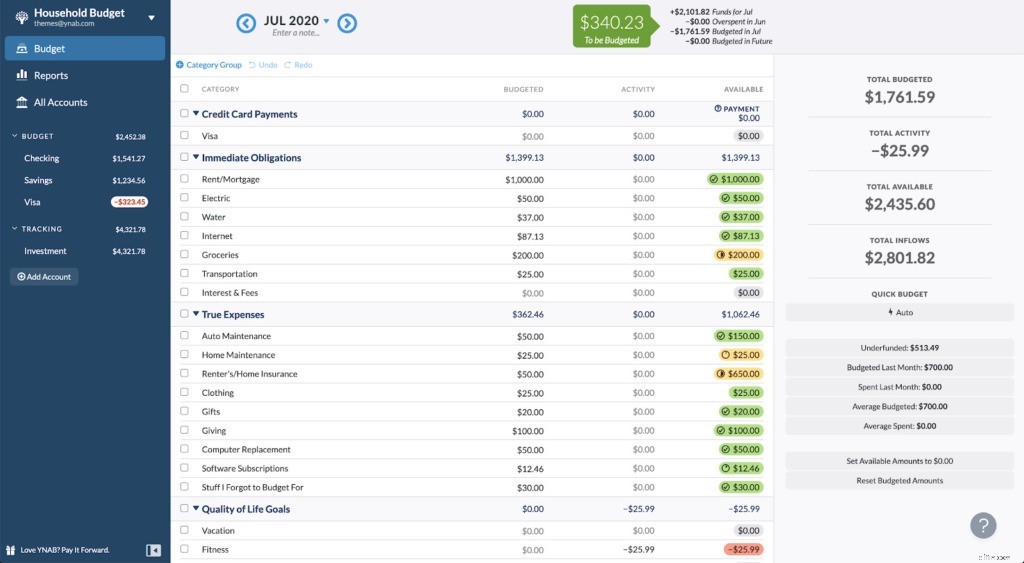
You can still use the classic theme if your heart has become fond of that Caribbean shade of blue, but the new default theme might grow on you quicker than you think (it sure did for us!).
“It’s cleaner, and much easier on the eyes (loved that blue, but this is just so much better). Thank you for continuing to improve this product, makes me happy to keep using it and recommending it to everyone in my life!” -A Happy YNABer
Dim Lighting? Go Dark
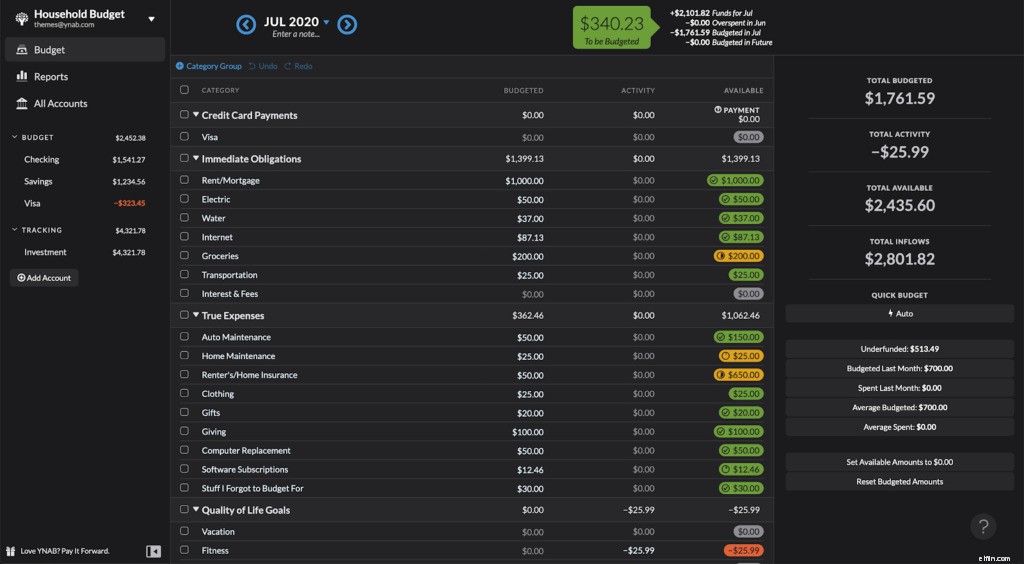
Make your evening eyeballs less fatigued with your budget in dark mode. Perks of dark mode include reducing your eye strain and promoting good sleep. Here’s what dark mode looks like:
“My eyeballs THANK you, my future children thank you, the WORLD indeed thanks you!” -Another happy YNABer
Collapse the Sidebar for More Real Estate, More Privacy
Reconcilers, rejoice! Now you can collapse the sidebar on the web app to give you maximum screen real estate that comes in handy for things like reconciling your budget.
An added plus: you can collapse your budget down so the balances in the side bar don’t show—this is great when you want to show your budget (but not your account balances) to a friend.
“Having the ability to resize or collapse the sidebar is a dream come true! Thank you for making the app better and better! Keep up the great work.” -Yet another happy YNABer.
Enjoy your new budgeting themes and resizing, and if you want to hear more about YNAB product updates, don’t miss the recent Reddit AMA with YNAB’s chief product officer, Todd.
-

Budgeting for College: A Student's Guide to YNAB
Ahh…college. The ultimate crash course in Adulting 101. You probably sashayed onto campus feeling triumphant at first—you’d made it. You escaped high school. You had your schedule and your room
-
YNAB Budget Reports: Understand Your Spending with Visual Insights
Budget reports! Budget reports! Long live, budget reports! You want to slice and dice your financial data every which way? Check. You want a high-level view of how you’re doing? Done. You want to get
budget
- Mortgage Management in YNAB: A Step-by-Step Guide
- YNAB Grocery Budgeting: Tips for Saving Money & Reducing Food Waste
- YNAB Budget Update: 4 Powerful New Features to Simplify Your Finances
- YNAB Budgeting Mastery: 8 Advanced Tips for Financial Control
- Wedding Budgeting: A Step-by-Step Guide Using YNAB
- Baby Budgeting: Planning Finances for Your New Arrival in YNAB
- Mastering Monthly Budgeting in YNAB: A Step-by-Step Guide
- YNAB Business Budgeting: A Step-by-Step Guide for Side Hustles
- Build a Bare-Bones Budget in YNAB: Financial Security & Savings
-
 YNAB Fresh Start: Refresh Your Budget for a New Financial Year
With the new year, there’s a lot of noise about new beginnings, clean slates, reinvention and do-overs. Or, as we like to call them here at YNAB, Fresh Starts. But, what is a budgeting Fresh Start, y...
-
 YNAB Setup Guide: Your First Day with You Need a Budget
So, you’ve figured out that You Need a Budget. Congrats! That’s an essential first step. Now what? Seriously. What are you going to do about that? Oh right, that’s our job. We...