
YouTube Advertising: A Comprehensive Guide to Brand Growth
As the second most popular search engine worldwide, YouTube is one of the most powerful platforms for businesses trying to capture customers’ attention.
With nearly two billion users logging in every month, the platform has tremendous capacity for helping brands attract new audiences and establish a loyal following.
Given how vital YouTube has become to a successful digital strategy, it’s surprising to remember that advertising on the platform started only a decade ago.
YouTube is one of the best options for creating a cost-effective advertising campaign:
- Average CPV: $0.026
- Average view rate: 31.9%
- Average view CTR: 0.514%
History of YouTube Ads
With the debut of Participatory Ads and Brand Channels in 2006, YouTube began offering businesses the chance to reach a wider audience than ever before.
More developments quickly followed, like the launch of overlay InVideo Ads and the expansion of Homepage ad formats from one to seven.
Over the years, more and more ad options and tools have been developed to make creating advertising campaigns on the platform both easier and more customizable.
YouTube can be an profitable advertising tool if you are willing to take the plunge.
Start your YouTube journey today so you can start reaping the benefits that the platform can bring.
Benefits of Advertising on YouTube
There are many benefits to advertising on YouTube—from targeting and customization capabilities to measurability and affordability—but the most important benefit is actually the simplest: Reach.
After all, what good would a billboard do if the road it’s on doesn’t get any traffic?
Let’s walk through exactly what YouTube advertising can do for your brand.
1. Expand your digital reach.
Along with the almost two billion YouTube account holders who visit the website monthly, there is a vast, unregistered group of youtube users who contribute to the platform’s approximately five billion daily video views.
With each video view there is the potential to expose your ad to someone who could be interested in what your business offers.
The question is: how do you find them?
With YouTube Ads, the bigger the net you cast, the more potential customers you can connect with.
People who would be interested in your products will probably come from all walks of life.
Taking the time to consider the multiple different customer demographics that your ads on YouTube would serve well is the best way to capitalize on this advertising platform.
2. Find customers with advanced targeting.
Besides basic identifying information like age, gender, and geographic location, what other recognizable characteristics do your current customers have?
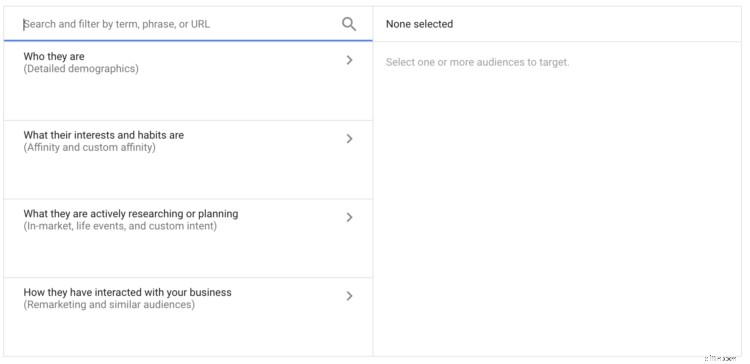
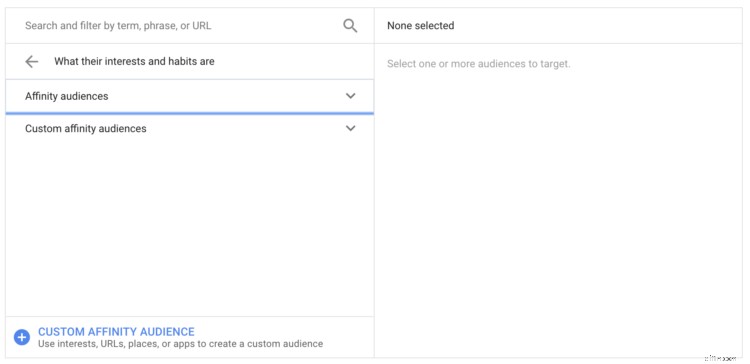
With YouTube Ads you have the capability to target videos by Topic, Category, and Keyword.
In doing so, you can increase the likelihood that the audience finds your ad to be relevant. Additionally, with Placement Targeting, you can identify specific YouTube pages you want your ads to appear on.
Utilizing targeting features like these make it much easier to ensure your ads get in front of the right customers at the right times.
In addition to letting businesses narrow in on their intended audience, YouTube Advertising grants a certain level of customizability that allows the advertisements to be more personalized than Search Ads.
As an added bonus, these video ads give businesses the capacity to be as creative as they’d like and let their voices be heard.
Due to the many different types of YouTube Ads (more on those later), businesses have the ability to choose the formats that best help them achieve their goals.
3. Customize ads to meet your goals.
Unlike Search and Shopping Ads, which need to follow strict guidelines in order to be eligible to run, YouTube Ads give businesses more freedom in choosing their advertising approach.
Brands can use the platform to tell stories about themselves and their customers, share valuable information, explain their products, and more.
This wide range of possibilities truly makes YouTube one of the most dynamic and flexible advertising platforms out there.
Given the platform’s advertising capabilities, it’s surprisingly affordable for businesses of all sizes.
If you’re concerned that YouTube Ads will take a large chunk out of your advertising or marketing budget, you should take a closer look at the fine details.
YouTube’s Advertising Cost
The cost will vary based on your audience targeting, your marketing goals, and your video.
According to Penna Powers, the estimated costs are:
- In-Display Ads: $0.30 Average Cost-per-View (CPV).
- In-Search: $0.10 Average Cost-per-View (CPV).
4. Run cost-effective campaigns.
You don’t necessarily need a fancy camera or the assistance of a creative agency to create your ads.
YouTube put together this handy guide to help businesses prepare, shoot, and edit video ads all on a smartphone.
A typical ad view generally runs between $0.05 and $0.10, which is low compared to the cost of some keywords on the Search Network, which can run for $50 per-click or more.
And not only are video views themselves relatively cheap, but, as with PPC ads, advertisers only pay when users choose to engage with the ads.
Even compared to Search ads, YouTube has an affordability advantage.
Because whereas Search ads count a quick click of a button as engagement, the TrueView ad format only counts sustained viewing as engagement.
This means you never pay for people who see your ad but quickly skip it.
It really couldn’t be easier to keep track of your budget and measure the success of your YouTube Ads.
By checking your Google Ads account, you can track views and costs, and get an idea if you’re reaching the right audience.
5. Measure your ads’ success.
Under the Analytics tab in your YouTube account you can learn more about the people who’ve viewed your ads.
Digging into this data can provide you invaluable insight into how well your ads are really doing.
For example, you can learn:
Which ads your customers are watching
- How long they watch them.
- At exactly what points they disengage.
- You can also use the Analytics tab to help you determine which of the many ad formats are performing best.
Figuring out which types of ad makes the most sense for your business will take some trial and error.
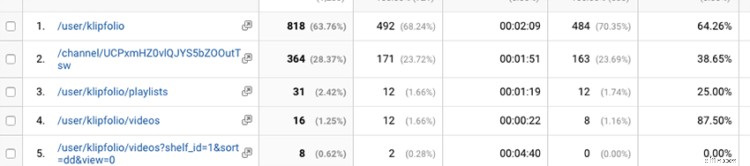
You can also connect your YouTube account with your Google Analytics account to dive deeper into your video campaign data.
You can see, for example, the top “pages” on your YouTube channel with more in-depth metrics like bounce rate, unique pageviews, and average time on page.
via Klipfolio
In experimenting with different ad formats and approaches, you might find that one works best, but you may also find success across all ad types.
It depends completely on the nature of your business and the advertisements themselves, so keep trying new strategies to discover what works best.
Types of YouTube Ads
YouTube offers a variety of ad formats that businesses can use to keep their customers engaged:
- Trueview.
- Pre-Roll.
- Bumper Ads.
Each of these formats has its own unique advantages and use cases.
Depending on what goal you’re trying to accomplish, you may want to use only one format or potentially combine multiple formats.
1. TrueView Ads
For some of their ads, YouTube uses a unique format called TrueView.
These ads can be shown on the Google Display Network in addition to appearing YouTube.
For Standard TrueView Ads, advertisers are only charged when a user watches at least 30 seconds of the video ad, or if the video is less than 30 seconds, they have to watch the whole thing.
In addition, you are charged for a view if the viewer engages with your ad by clicking on a link, for example.
And within TrueView Ads there are two subcategories of ads, In-Stream and Discovery.
In-Stream Ads.
TrueView In-Stream Ads are advertisements that play before, during, or after a YouTube video has played.
These are skippable ads after five seconds, but you won’t be charged if viewers who opted to skip the ad.
In-stream video ads can include call-to-actions that you can personalize to fit your message that will appear as overlaying text over the video, making them TrueView for action ads.
Google recently changed the guidelines for TrueView for Action ad formats so that cost is incurred after 10 seconds.
TrueView In-Stream Ads are generally what businesses decide to pursue when considering YouTube Ads, but they can be tricky to do right.
It is vital you keep in mind that users have the ability to skip the video after five seconds.
Make sure you include a logo or your business name somewhere in the first five seconds so that even if they do skip, you still gain a small amount of brand exposure.
In addition, don’t forget to put your logo, website, and a call-to-action at the end of the video and let it linger for a few seconds so that users have a chance to decide if they’d like to take further action.
Most importantly, make sure your ads are compelling, especially in those first five seconds.
Whereas In-Stream Ads play automatically for viewers who are trying to watch other videos, Discovery Ads are dependent on appearing both relevant and appealing to be seen.
Discovery Ads.
TrueView Discovery Ads show up on YouTube search results pages and as related videos on the right-hand sidebar.

Unlike In-Stream Ads, businesses are charged each time their Discovery Ads are clicked on, no matter how long they end up watching the video.
Discovery Ads are a great option for how-to or product demonstration videos.
If you’re worried about viewers immediately skipping In-Stream Ads and not engaging with Discovery Ads, there are other ad options that could be the solution you’re looking for.
Pre-Rolls and Bumper Ads don’t allow viewers to skip them, but they do come with some drawbacks.
2. Pre-Roll Ads
Between the two ad types that can’t be skipped, Pre-Roll Ads seem more lucrative.
These ads, which can play before, in the middle, or after a video, can be up to 20 seconds long, but are usually around 15.
A Pre-Roll Ad only play in the middle of a YouTube video if it is 10 minutes or longer.
Since 15 seconds can go by quickly, it is best to use this time wisely with a call-to-action.
It is important to note that businesses are charged per ad view, regardless of whether or not it drives viewer engagement.
But, there are some great strategies you can take to make the most of each view.
Consider breaking the fourth wall, and acknowledging the fact that users are watching an ad.
In doing so, you can seem like less of an annoyance and hopefully your ad will become more approachable.
For your Pre-Roll Ads, you should set up a call-to-action overlay to make it easier for viewers to learn more about your ad.
Since you’re already paying for the exposure, you can make your ads feel less intrusive by giving viewers the option to click through to your website if they’d like.
Additionally, you should use companion banners that run next to the video to your advantage. These banners stay after your ad runs so that viewers can finish watching their YouTube video, but still be able to take action after.
If Pre-Roll Ads don’t quite fit your style, Bumper Ads might be the quick-fix you need.
3. Bumper Ads
Similar to Pre-Roll, Bumper Ads are both non-skippable and cost businesses every time they are shown.
These ads are very short, as they can only be six seconds long, and play directly before videos on YouTube.
Because of the brief runtime, Bumper Ads are generally better suited for building brand awareness rather than promoting a product.
It isn’t recommended that you try and fit a lot of information in one of these ads, as they will come across as confusing and complicated.
But, if you’re really interested, there are alternative tactics you can take to tell a more complete story.
Make sure your ad is clear and concise, with a singular message that’s easy to understand. A lot of advertisers try to put too much into one ad and end up overstuffing it.
To counteract this, try using remarketing audiences so you can create a sequence of videos for users to watch.
In doing so, you can take a longer brand narrative and chop it up into multiple ads to tell a story.
Users that make it to the end of the sequence tend to be highly engaged and are more familiar with your brand.
Advanced strategies like this one are one way businesses make the most out of YouTube Ads.
Let’s explore some other best practices that contribute to a successful account.
-

Navigating Global Markets: A Guide to Cross-Border E-commerce
Centuries before GPS and various forms of travel technology, navigators relied on stars to point them in the right direction –– using them as a guidance tool while embarking into territories and
-
Shipping Software Solutions: A Comprehensive Guide & Provider Comparison
The ecommerce industry’s main differentiator from the technology industry is in physical fulfillment. Once you capture cash, you have to then fulfill your shipping and delivery promises. The ent
Business
- Construction Retainage: A Complete Guide for Contractors
- Ecommerce Product Photography: A Comprehensive Guide for Success
- Facebook Advertising: A Comprehensive Guide to Effective Strategies (2024)
- Aesthetic Intelligence: Transforming Your Brand with Visual Appeal
- Ecommerce Marketing Plan: Drive Traffic & Boost Sales
- Maximize Sales with Google: A Comprehensive Guide for Merchants
- Social Media Advertising 2024: Platform Selection & Effective Ad Strategies
- Mastering Walmart Marketplace: A Comprehensive Guide for Sellers
- First-Time Home Buyer's Guide: A Step-by-Step Approach
-
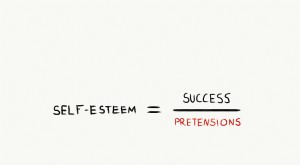 Boost Self-Esteem: Applying the Psychology of William James
In 1994, Michael Jordan, the greatest basketball player of all time, retired from the Chicago Bulls and tried to pursue a professional baseball career. Some say Michael was paying tribute to his fathe...
-
 FAFSA 2023-2024: A Comprehensive Guide to Free Federal Student Aid
Applying to college is stressful. You have mountains of essays to write, fears around acceptance, and the massive burden of figuring out how youre even going to pay for it all. You may have started r...