
Mastering Core Web Vitals: A 2024 SEO Guide for BigCommerce
Google’s latest algorithm updates for page experience — primarily the much-talked about Core Web Vitals — will go into effect in May 2021. But if you’re not aware of what this means for SEO or your BigCommerce website, don’t worry — we’ve got you covered.
In this guide, we’ll review Google’s page experience signals, including Core Web Vitals, ways you can measure page experience and specific resources you can leverage to improve your SEO and website experience.
Google’s Seven Signals for Page Experience
According to Google, page experience is a set of signals that measure how users perceive the experience of interacting with a web page beyond its pure informational value. The idea behind page experience is to make your website the best it can be for users.
To make that happen, Google has shared seven search signals that you can focus on:
- Mobile friendliness
- Safe browsing
- HTTPS/SSL, or encryption
- Intrusive interstitials
- Largest Contentful Paint (LCP)
- First Input Delay (FID)
- Cumulative Layout Shift (CLS)
While the first four items on the list have been around for years, the last three make up the new Core Web Vitals, which address loading speed, interactivity and visual stability.
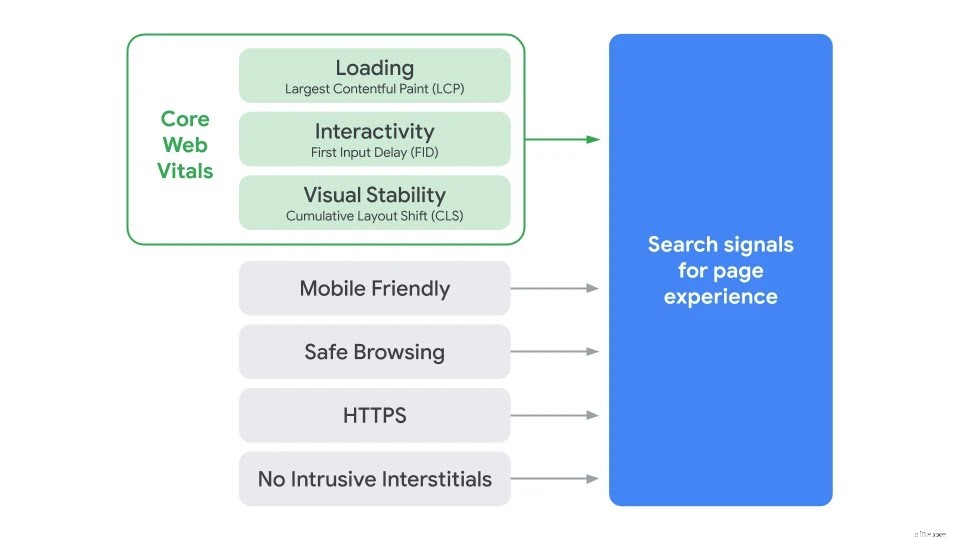
Something to keep in mind though is that each of these signals should be part of your overall SEO and customer experience strategy. Google made it clear that these changes will join the hundreds of signals they take into consideration when delivering search results.
So now that you know what each of the search signals are, let’s explore how they impact SEO and customer experience.
1. Mobile-friendly web pages.
Since the arrival of smartphones, mobile search has grown significantly. And anticipating the impact of smartphones, Google prioritized mobile-friendly websites in its search rankings back in 2015.
What mobile-friendly, or mobile-first, means is that it must be easy for users to complete a task, such as finding your return policy, directly from their phones. To make your ecommerce website mobile-friendly, you should choose a theme that supports responsive design, in which each element on the page automatically adapts to a user’s screen — no matter what device they’re using.
2. Safe browsing.
One of the page experience signals that Google has relied on is safe browsing. This means your website doesn’t have any malicious or deceptive content. For example, malware or social engineering content.
3. HTTPS/SSL.
This rankling factor boosts websites that adopt HTTPS, which provides users with a more secure browsing experience. BigCommerce offers a free Secure Sockets Layer (SSL) certificate for ecommerce stores on any plan, allowing you to enable site-wide HTTPS. If you’re not using BigCommerce, you can reach out to your domain provider to purchase a SSL.
4. No intrusive interstitials.
While no intrusive interstitials may sound complicated, it simply means don’t add elements to your website that make it hard for users to access content. For example, don’t show a pop-up that covers the main content on the page right when someone navigates to it from the search results.
However, there are some types of interstitials Google says are okay, such as banners for cookie usage or a full-screen blocker for age verification.
5. Largest Contentful Paint (LCP).
Slow loading websites have been a major pain point for users for years. Inevitably, you’ve abandoned a website before, simply because the page didn’t load fast enough. However, there’s never been a really effective way for website owners to measure the extremely complex metrics that encompass page loading speed.
By looking at the Largest Contentful Paint (LCP), you can determine how long it takes the largest image or text block on your website to render. And according to Google, a good user experience means that LCP should occur within 2.5 seconds of when the page first starts loading.
6. First Input Delay (FID).
Once the content loads on a page, the next indication of a good experience is when you can start interacting with that content. This is where First Input Delay (FID) comes in to quantify responsiveness.
FID measures the time between when someone first interacts with the page to when the browser processes that interaction. For this metric, Google states that pages should have an FID of less than 100 milliseconds.
7. Cumulative Layout Shift (CLS).
Cumulative Layout Shift (CLS) measures how often a web page moves when users are interacting with a site. Specifically, CLS accounts for the sum total of each unexpected layout shift, therefore emphasizing the importance of visual stability on the page. A good score for CLS, according to Google, is 0.1 or less.
One thing to keep in mind is that not all layout shifts are bad — only the unexpected ones. For instance, when someone starts typing in a search box or playing a video, they expect that some of the content on the page will change.
Now that we’ve reviewed each of the seven search signals and defined a good score for the Core Web Vitals, let’s dig into how you can measure them.
How to Measure Core Web Vitals
To help you better understand the areas that are most important, Google categorizes each Core Web Vital as poor (red), needs improvement (yellow) and good (green).
Additionally, Google offers several solutions for measuring Core Web Vitals. For those with less technical experience, PageSpeed Insights provides a report on performance, as well as suggestions on how you can improve that page.
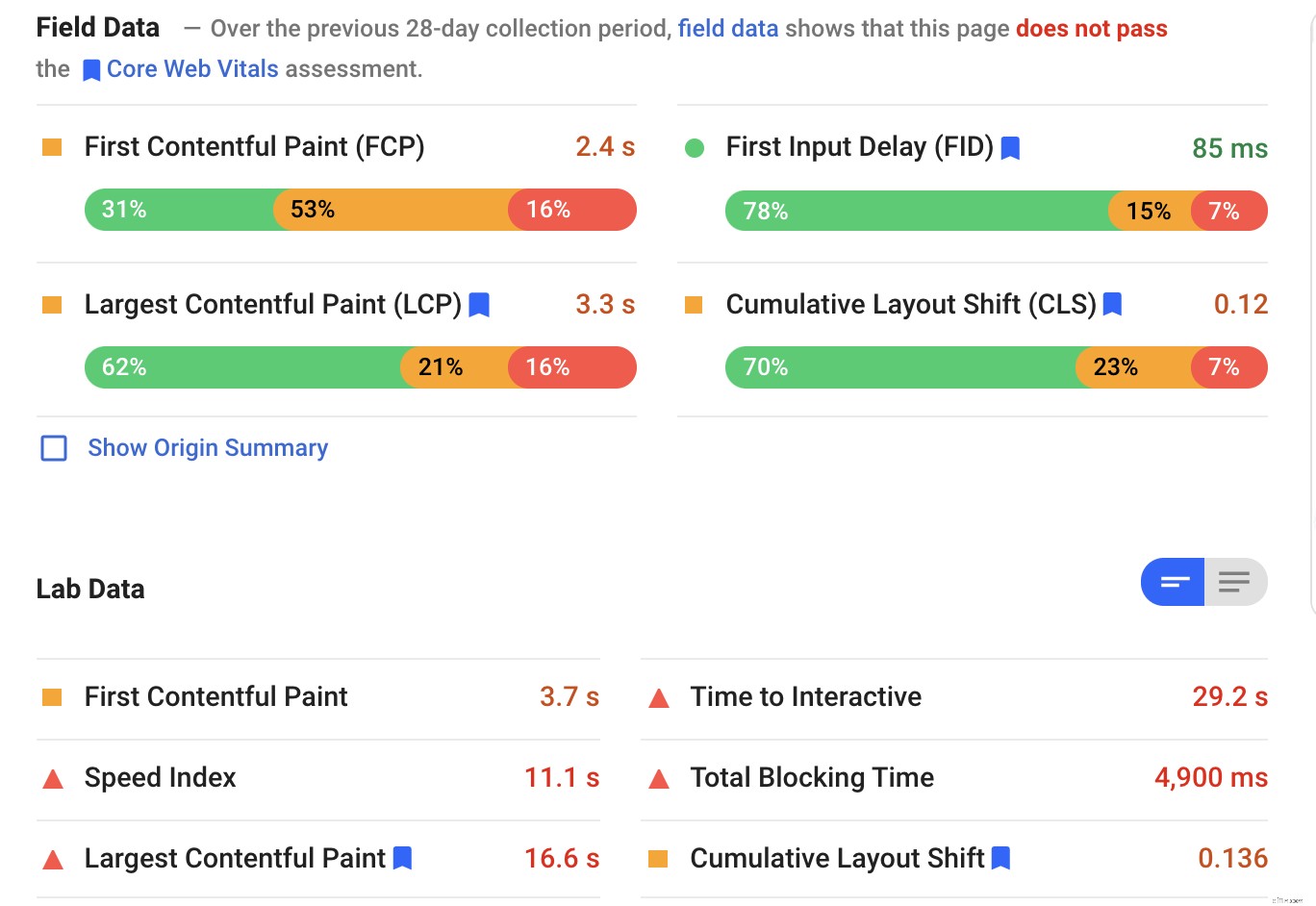
Another tool that should be part of your SEO arsenal is Google Search Console. In addition to providing data on search traffic, queries, clicks and referral sites, Google has now included a Core Web Vitals report. The report shows you URL performance grouped by status, metric type and URL group (groups of similar web pages).
For those with more technical experience, Google has several in-depth resources, including:
- Lighthouse
- Web-vitals JavaScript library
- WebPageTest
For ecommerce businesses that sell internationally, you’ll also want to measure page load times for each region. As an example, let’s say you’re based in the United States, but you have a landing page targeting the United Kingdom.
You’ll want to understand page load time in the UK and ensure it’s as good as your US pages. This is especially important for regions like Australia where internet connection speeds can vary widely across the continent.
As for the timing of these changes, an update from Google in April of 2021 states that they will begin using page experience as part of their ranking systems beginning in mid-June 2021. But, page experience won’t play its full role until the end of August.
How to Prepare Your Online Store for the 2021 Core Web Vitals Update
For BigCommerce merchants, you already have a leg up when it comes to SEO optimization. Mobile-ready themes, Insights and Analytics tools, fields for page titles, meta descriptions and image alt texts, a content delivery network and Akamai Image Manager are all included. Plus, you can take advantage of them — even if you don’t have any coding experience.
Of course this doesn’t mean you don’t still need to be proactive about optimizing your site for page experience. In fact, it’s one of the things you have the most control over to make significant changes that will improve your rankings.
However, making all these changes can be daunting for anyone, whether you’re running a small business or optimizing several ecommerce sites. To help, we’ve pulled together a list of resources for you.
1. Take advantage of BigCommerce University SEO coaching.
If you’re a BigCommerce merchant, you can take advantage of our SEO coaching and auditing services. Through virtual sessions, our coaches work with you to measure your traffic and SEO performance, and then provide recommendations on the specific improvements you can make.
With three different SEO packages available, merchants can choose the option that best fits their specific needs.
2. Explore BigCommerce Agency partners.
BigCommerce Agency partners are another great resource for merchants — or for anyone looking for additional SEO or developer support. Below is a short list; however, you can find even more Agency partners listed in our directory.
- ROI Revolution
- Trellis
- Parkfield
- Plum Tree Group
- Exclusive Concepts
- Visiture
We even wrote a whole blog article with tips for choosing an SEO agency that can help ensure you’re picking the right partner to work with.
3. Look into getting new SEO tools.
In addition to Google Search Console and Google Analytics, you can also look into more robust tools that are specific for SEO. Here are some options that our team recommends:
- Semrush offers a wide-range of features that encompass everything you need to track and analyze SEO, as well as content marketing, advertising and competitor research.
- Moz dives deep into SEO with tools for keyword research, rank tracking and on-page optimization. Plus, they have tons of free content on their blog.
- Ahrefs is an all-in-one SEO toolset that will audit your website, help you understand keywords, identify broken links, track your rankings and more.
4. Keep digging into Google’s documentation.
If you’re working on a limited budget, don’t worry. Google has a wealth of free resources for you to learn more about how you can optimize your website for search:
- SEO Starter Guide: Get a complete overview of the basics of SEO according to Google’s best practices.
- Advanced SEO Guide: Learn about advanced topics for managing and maintaining a website.
- Google Search Channel: Watch videos that share information and tools that you can use to improve your site in Google Search.
- Core Web Vitals: Dig into Google’s documentation for even more information about each of the Core Web Vitals and how they affect your ecommerce site.
5. Check out more resources from BigCommerce.
Did you know that BigCommerce has a robust Knowledge Base with several guides dedicated to SEO best practices? If not, feel free to check them out here:
- Guide to SEO
- Guide to Site Speed
- Guide to Market and Keyword Research
We also continuously blog and create content around all things ecommerce and SEO. In fact, we’ve been writing about it for years. Check out some of our top SEO-focused blog posts:
- Ecommerce SEO Guide: How Online Stores Can Drive Organic Traffic
- How to Optimize Ecommerce Images for More Sales
- The Top 10 SEO Myths: Don’t Fall Into These Often Repeated Traps
- How to Conduct an Advanced Ecommerce SEO Site Audit
- How to Build a B2B SEO Strategy That Will Put You Ahead of the Competition
Additionally, our team created a series of shorter webinars that address a wide-range of ecommerce topics. We recommend watching The Cardinal Rules of SEO and 4 Ways of Getting Traffic.
Two Easy Ecommerce Optimizations for Core Web Vitals
There’s a lot to dig into about Core Web Vitals and overall SEO best practices. But the deadline to comply is approaching quickly, so if you want to get started now, we’ve identified two easy things you can do.
1. Optimize and compress your images.
Between hero images, product pictures, carousels and banners, ecommerce websites have a lot of images. And for many ecommerce sites, images are the largest element that has to load, which can negatively impact your LCP metric.
In addition to compressing your images, consider removing some of them if they aren’t relevant to the content on the page. And always make sure your images are in the most updated, web-friendly format, such as JPEG 2000, JPEG XR or WebP.
Also, if you have a custom theme on BigCommerce, make sure you’re taking advantage of our content delivery network, in addition to optimizing your images.
2. Evaluate your third-party tools.
Third-party tools and plug-ins are one of the biggest culprits when it comes to making your pages load slowly. While many of these tools provide much-needed functionality, you may also have some that you’ve never used or have stopped using.
Some of the third-party code and tools that Google suggests looking into first include:
- Social sharing buttons
- Video player embeds
- Chat services
- Advertising iframes
- Analytics and metrics scripts
- A/B testing scripts for experiments
Google also advises not to use the same functionality from two different vendors. For instance, you probably don’t need two tag managers or two A/B testing tools.
Wrapping Up
We hope this guide gives you the headstart you need to better understand Google’s Core Web Vitals and all the other elements of page experience. At the end of the day, Google just wants what we all do — better website experiences for everyone. So as long as you continue to focus on creating quality content that adds value to your customers, you’ll be in good shape.
-
ETFs Explained: Your Comprehensive Guide to Exchange-Traded Funds
An exchange-traded fund, ETF for short, is an investment fund that lets you buy a large basket of individual stocks or government and corporate bonds in one purchase. Think of ETFs as investment wrapp
-

Investing in Canada: A Beginner's Guide to Building Wealth
Want to learn the basics of investing in Canada? Good, because we've got a steaming plate of invaluable, fresh-from-the-oven financial advice.How to Start Investing in CanadaWhether you live in a
Business
- Cost-Benefit Analysis: A Comprehensive Guide for Business Leaders
- Revenue Recognition Explained: A Comprehensive Guide to ASC 606
- Zero-Based Budgeting: A Comprehensive Guide to Financial Control
- AI Investing: A Beginner's Guide to Profiting from Artificial Intelligence
- Buying a Rolex: A Comprehensive Guide for First-Time Buyers
- ESG Investing: A Comprehensive Guide to Environmental, Social, and Governance Factors
- Comprehensive Financial Planning: A Practical Guide to Building Wealth
- Understanding Crypto Stablecoins: A Comprehensive Guide
- Conversational Commerce: A Comprehensive Guide for Businesses
-
Ecommerce Holiday Calendar 2021-2022: Boost Sales & Traffic
’Tis the season for online shopping … all year long. Every month has an occasion to celebrate, providing ecommerce businesses with frequent opportunities to engage and sell to...
-
 Streamline Accounts Payable: A Comprehensive Guide for Businesses
Whether you’re a small business owner or a manager within an international enterprise, keeping track of your spending and payments is an essential part of running a successful company. Keeping trac...