
Automate WordPress Email Notifications: Keep Subscribers Engaged
 Creating post notifications in WordPress will alert your subscribers of new content and get them back to your site. Here’s how to set these notifications up yourself.
A content management system capable of not only hosting content but alerting your subscribers that the content is there is a necessity for any business that relies on content marketing. After all, if no one reads your great content, you might as well not have written it in the first place.
WordPress CMS is a popular platform that offers solid tools to connect with readers, and one of those tools is a post notification system. Post notifications in your WordPress blog tell readers that a new post is available for them to read, and it will also make sure users in WordPress subscribe to posts. A WordPress email may be just the prompt your subscribers need to return to your site and absorb your content.
The WordPress subscribe and post notification function is easy to set up. Here are nine simple steps to do it on your own.
1. Load plug-ins
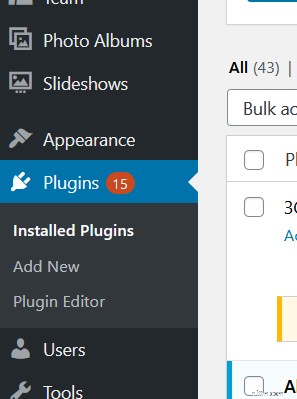
First, you need a quick and simple plug-in. Log in to your WordPress business website manager and go to the main dashboard. Click on the “Plugins” menu option on the left-hand side.
2. Install the plug-in
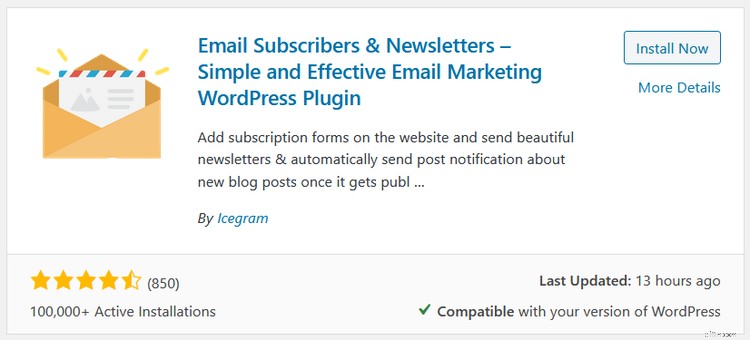
Search for “Email Subscribers & Newsletters.” Install the first plug-in that shows up.
3. Create a new campaign
With the plug-in installed, select “Email Subscribers” on the left-hand side and then click on “Campaigns” to launch a new campaign.
4. Create a new notification
Within the “Campaigns” tab, you will then select “Create Post Notification.”
5. Select an email list
Choose which email list you’d like to access to distribute the notification of a new post.
6. Choose your template
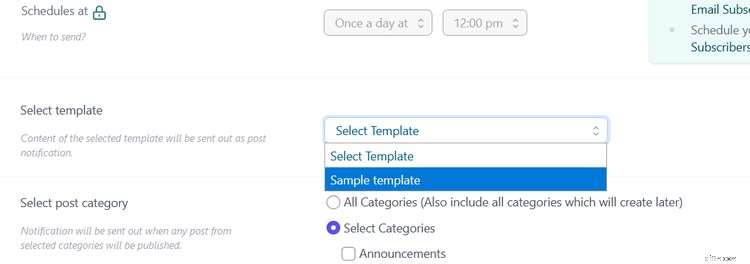
Next, you’ll select the template you’d like to use for your email by selecting the drop-down menu. To create a template, click on the green "Manage Templates" button in the top right.
7. Select the post category
Click on “Post Category,” which allows you to choose how you’d like to disseminate the notification of the post. The system will cross-check and match post categories with post notifications in the future.
Once you’ve matched, the post notification will be distributed to your subscribers. If you don’t care about the categories and just want to send out all WordPress recent posts, choose “All Categories.”
8. Set up custom post types
If you want to go a step further and get into custom post types (CPT), choose CPT, which will send notifications after publishing the selected CPT. Categories won’t be matched for CPTs.
9. Save your settings
Select “Save Changes” when you’re satisfied with the result. This completes the process and automates future post notifications.
Explore other ways to reach your subscribers via WordPress
Post notifications are a great way to keep your readers involved and engaged, but you should explore other outreach options in WordPress. For example, you could make a newsletter. WordPress newsletters are an excellent way to regularly reach out and touch your customers and remind them you’re there while also offering useful information.
You can create an RSS WordPress feed they can subscribe to, and you can use WordPress email subscription plug-in tools for additional help.
Website management and content management are vital to expanding your brand, so don’t neglect these critical areas. Put a lot of effort into great posts that provide real, practical information to your customers and aggressively distribute them using as many channels and tools as possible.
Post notifications are one way to do it but use the other methods described above to be sure you’re connecting with as many subscribers as possible.
-

Sending Money to Iran: A Comprehensive Guide to Reliable Options
Sending money to Iran is slightly more complicated than transferring funds to most other countries. In fact, most of the top money transferring companies--such as PayPal, Western Union, Xoom and Ikobo
-

Fast Money Transfer Options: Send Funds Instantly
Send money immediately to a friend or family member. Transferring money from bank to bank by wire can take up to four days or even longer. But if you've found yourself in a situation wher
Customer relationship management
- Overnight Money Transfer: Fast & Reliable Options
- Sending Bank Drafts: A Secure & Reliable Money Transfer Guide
- Send MoneyGram at Walmart: Domestic & International Transfers
- Send Gift Cards Easily: A Simple Guide
- Cashier's Checks: How to Purchase and Use Them Safely
- Money Orders: A Comprehensive Guide to Sending and Receiving
- Email Newsletter Creation & Sending: A Quick Guide
- WordPress Theme Installation: A Complete Step-by-Step Guide
- Craigslist Posting Guide: Reach Local Buyers & Sellers
-
Anonymous Money Transfer Methods: Safe & Secure Options
There are several options to send money safely and anonymously to a person, charity or business. Each option can facilitate a safe transfer and avoids the risk of mailing cash and negotiable instrumen...
-
![Send Money from Morocco: Fast & Reliable Options | [Your Company Name]](https://www.etffin.com/article/uploadfiles/202109/2021092517421304_S.jpg) Send Money from Morocco: Fast & Reliable Options | [Your Company Name]
Send Money from Morocco: Fast & Reliable Options | [Your Company Name]Whether you are studying abroad, in town on business or just visiting the country of Morocco, you may need to send money back home, perhaps to make your mortgage payment, or to help a family member wi...