
Transfer Shares to Groww: A Step-by-Step Guide
Greetings investors! Hope you have checked out the Groww stocks platform and have opened your account already. Wouldn’t it be great if you had all your holdings at one place for an easy trading experience? The good news is, once you have opened your Demat account at Groww, you can transfer shares from your Demat accounts with other brokers to Groww by following the off-market transfer process.
Here’s a step by step guide to help you. Read on!
Before we begin make sure you have the Client Master report which has the details of the client ID and Demat account from the broker you have a Demat account with. Also, keep the CMR you received from Groww handy.
Registration for Easiest on CDSL ( Easiest is CDSL’s internet based facility)
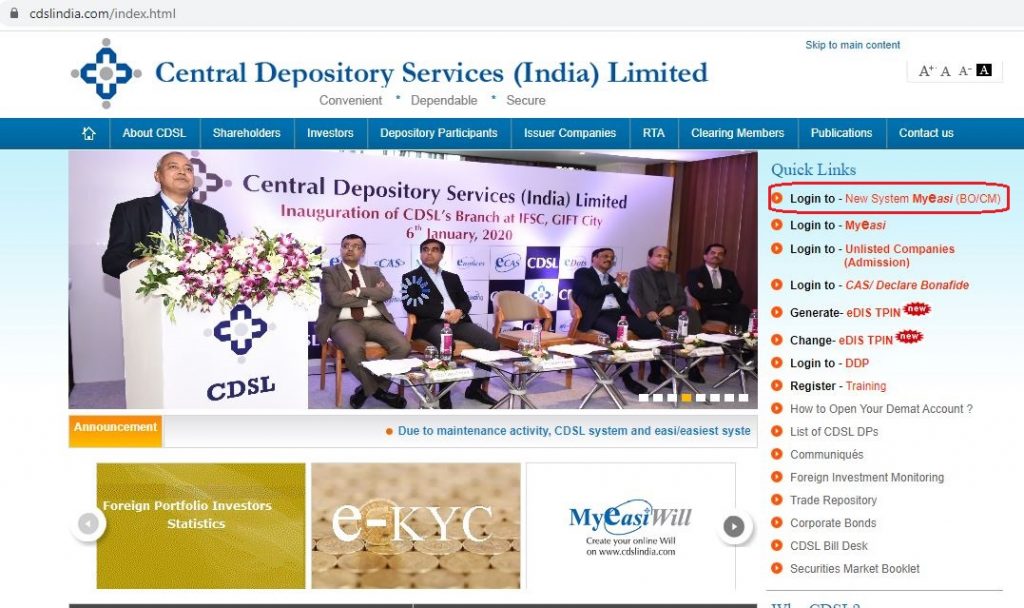
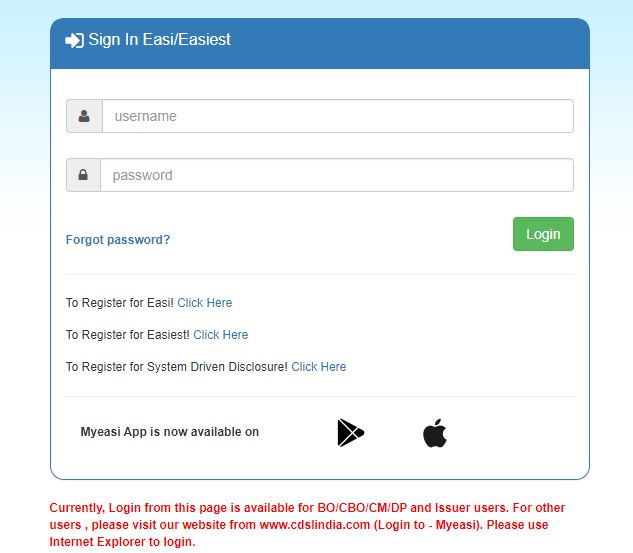
Step 1: Go to cdslindia.com and click on “Login to-New system Myeasi (BO/CM) :
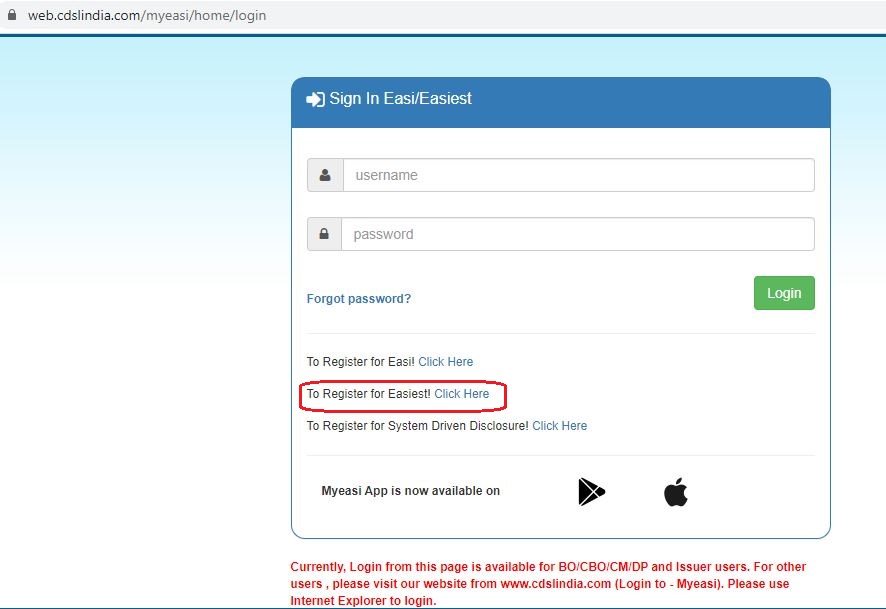
Step 2: Click on ‘To register for easiest click here’
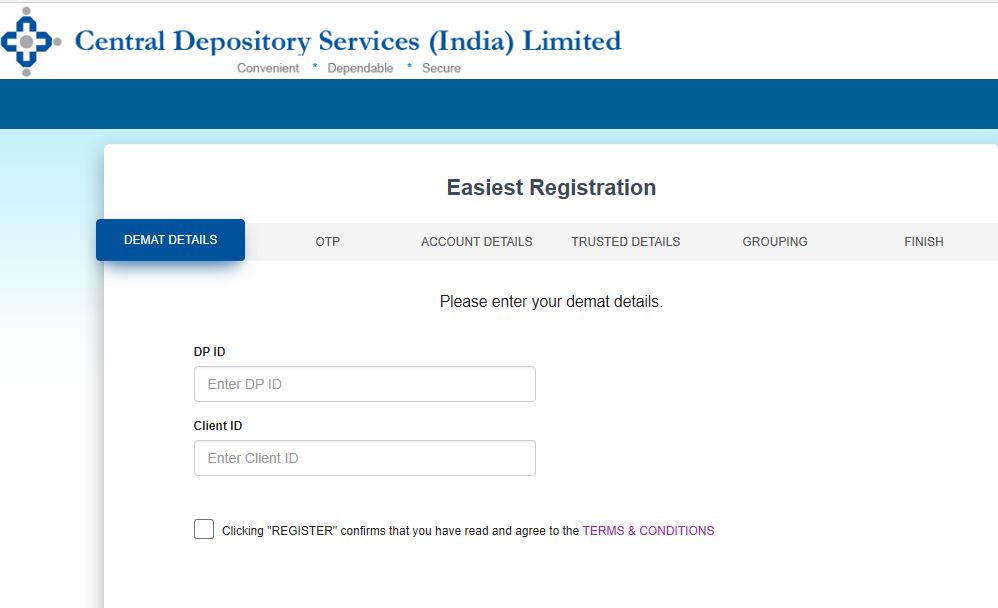
Step 3: Enter your Client ID and DP ID. Please note, this client ID and DP ID is the one you have received from the external broker and not that of Groww. The first eight digits of your Demat number are the same as your DP-ID and the next eight numbers are the same as your Client ID.
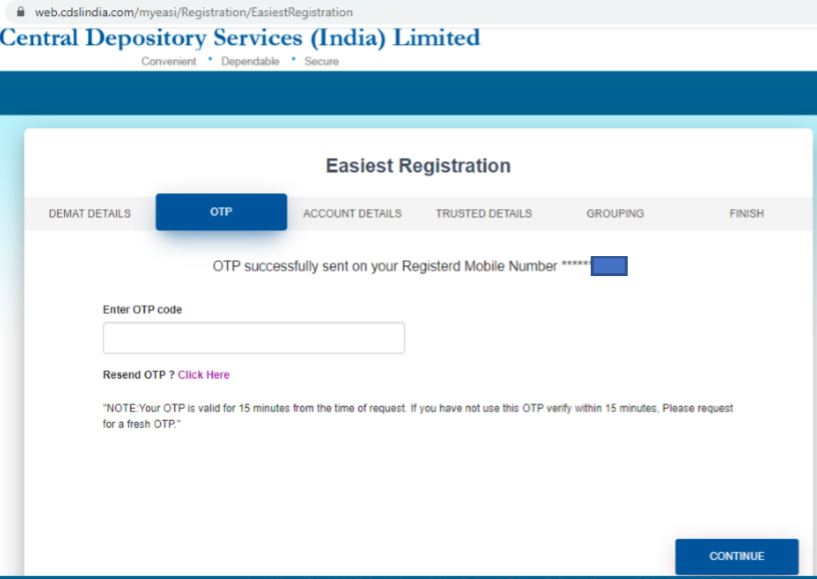
Step 4: An OTP will go to your registered mobile number. Enter the OTP and click on Continue to proceed.
Step 5: Fill the necessary details and then select the account type as ‘Trusted Account (PIN) to continue
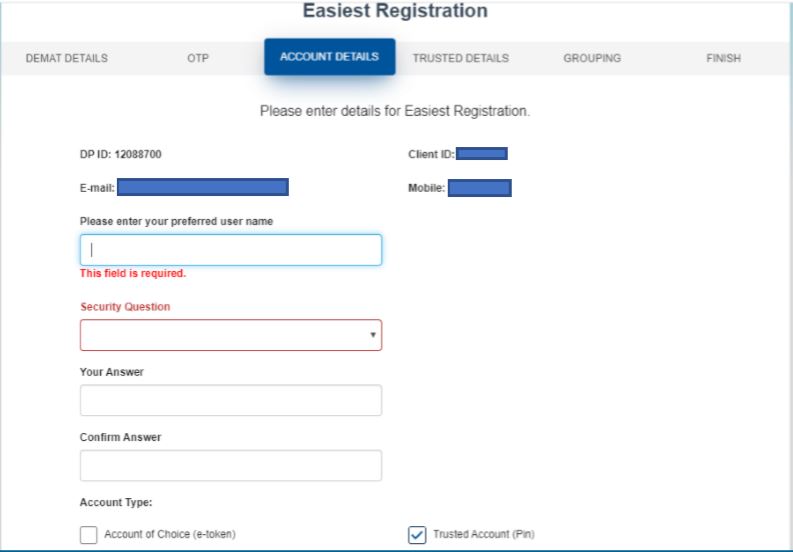
Step 6: In this screen, you need to enter your Trusted account details.Trusted means details of the broker you are transferring the shares to.So here, you are required to enter your Groww Demat account number. You can find it in the CMR copy sent to you. You can also find it on the Groww app under personal details. Your Groww Demat number is of 16 digits and starts with 120887.
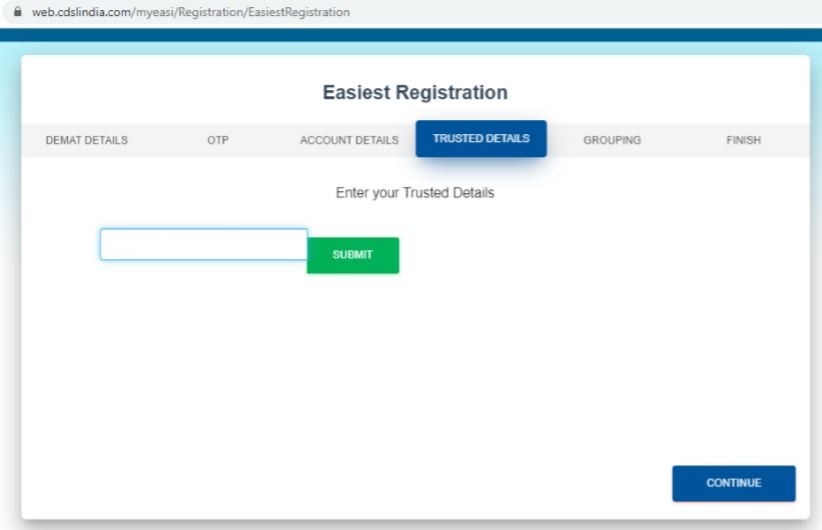
Step 7: Now suppose you have holdings in multiple Demat accounts. You would have received your Demat account numbers with all these brokers at the time of account opening. So at this stage, you can enter the Demat account details of each of these brokers and click on the ‘+’ sign to add the entries. Please note you can add details of brokers who are registered with CDSL only ( upto 4 such entries are allowed).
Once you have added all the accounts from where you want your holdings transferred to Groww, click on Continue. The details you enter will be verified by the brokers ( depository participants) and post authentication you will receive a registration confirmation.
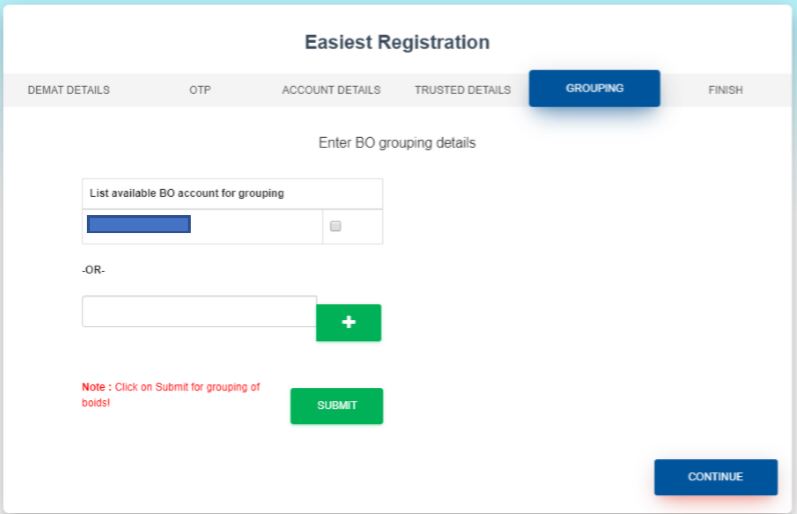
Step 8: The registration is now complete. You will now receive three emails in succession from CDSL.The first email will be a registration approval email. The second and third emails will have your login credentials – Login ID, password and PIN.
Login To CDSL Easiest
Step 1: The next step is to log in to the CDSL Easiest – https://web.cdslindia.com/myeasi/home/login with the credentials you have received and continue the process.
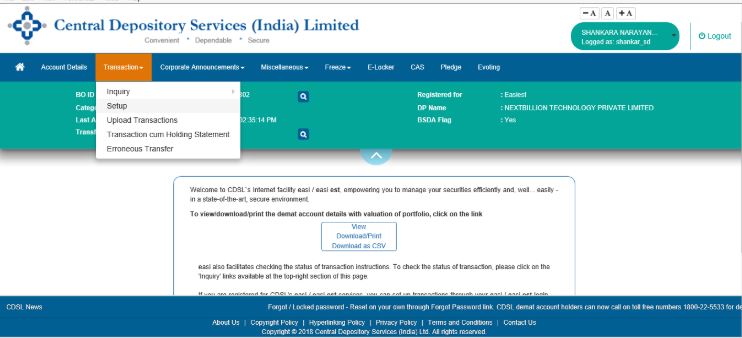
Step 2: After login, click on the tab Transaction and select Setup for transferring stocks through Easiest.
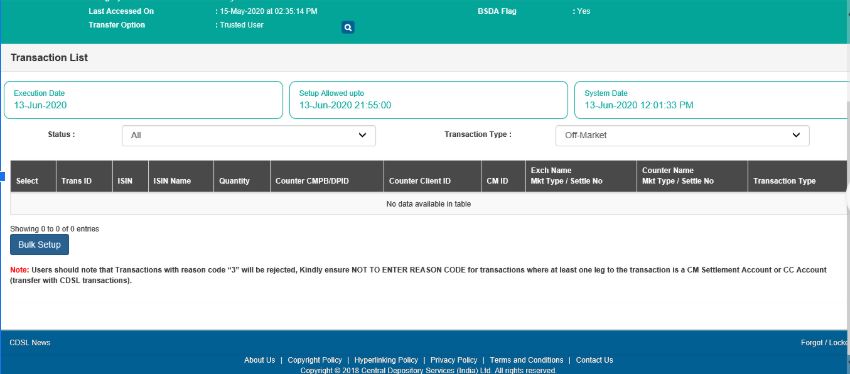
Step 3: In Transaction, Setup select the Bulk Setup option.
Step 4: Select the “+” icon to add the ISIN, quantity and the reason for transfer off-market details.
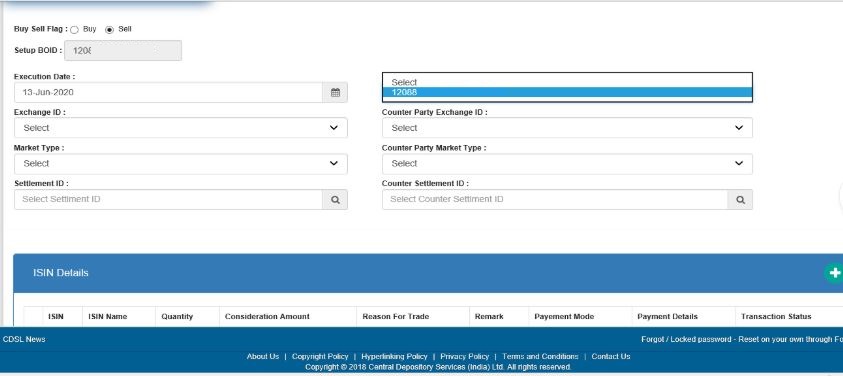
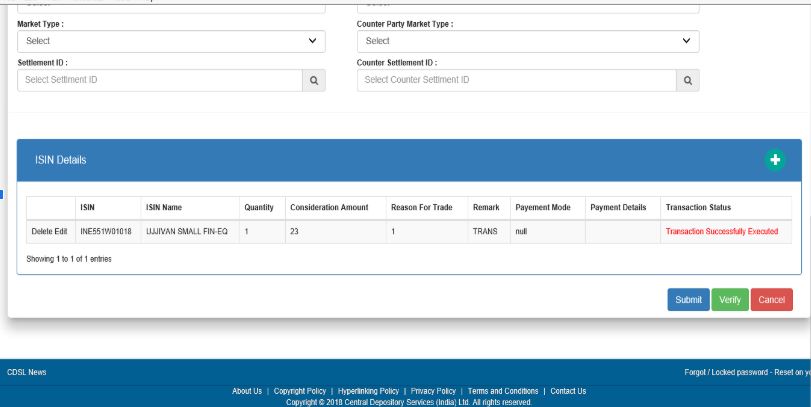
Step 6: After entering ISIN, quantity and the details about the reason, click on the SUBMIT option to continue. On verification select the option for COMMIT & enter the OTP PIN received on your registered mobile no.
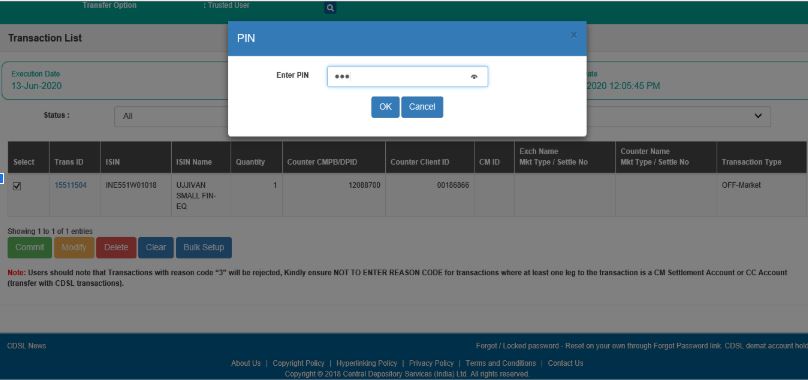
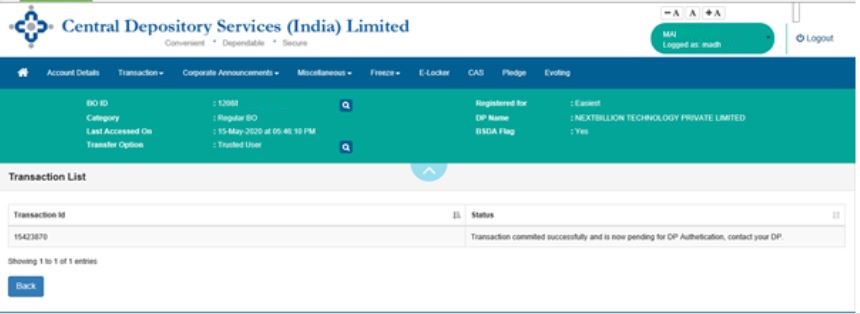
Step 7: After entering OTP the Off-Market Transaction request will be completed from your end and just needs to be authenticated from Groww’s end. You will receive communication from CDSL and from our end as well once the authentication process is completed. You will be able to see your external holdings on Groww dashboard once the process is completed.
Hope this was helpful. Happy Investing!
-

Transferring Money to Navy Federal: Methods & Instructions
Man writing a check at the bank Founded at the end of the Great Depression, the Navy Federal Credit Union has grown to now serve over 10 million member-owners. The financial institution is a
-

Transfer Money from India to UAE: Options & Best Methods
How to Transfer Money from India to UAE The United Arab Emirates has become an exciting hub of business, particularly the bustling city of Dubai, which has an open economy that attracts indus
Stock investment skills
- Transferring Funds from PayPal to Your Credit Card: A Step-by-Step Guide
- Transferring Funds from Credit Card to Chase Bank: A Step-by-Step Guide
- Transferring AT&T Account Ownership: A Step-by-Step Guide
- Transferring Money to a Chase Account: A Comprehensive Guide
- Transfer Debit Card Balance: A Simple Guide to Moving Funds
- Transferring Funds: How to Move Money from eChecks to Your Checking Account
- Debit Card to Debit Card Transfer: A Comprehensive Guide
- Open a Demat Account Online: A Simple Guide for Beginners
- Effortless Bank Transfers: A Comprehensive Guide
-
 Credit Card Cash Advances: How They Work & Associated Costs
You can pull money from your credit card account at an ATM. You can get cash from a credit card by taking out a cash advance. However, cash advances can be costly. You're charged a higher...
-
 Sending Money from Iraq: Options & How-To Guide
Transfering your money can be done in most banks in Iraq. Sending money from Iraq to another country or another location in Iraq, is easily done at any money transfer station. Most banks in I...