
Simplify Tax Season: Your Guide to Preparation & Key Documents
W-2? 1099-MISC? 1098-E? Check, check and bingo. It’s tax time!
Tax season has arrived and, with it, a flurry of trifold, self-mailers with perforated, tear-away edges—each containing a mathematical summary of your life in concisely-labeled boxes. Meanwhile, accountants across the nation have warmed up their number crunchers and stocked up on extra mouse batteries.
And you? Have you located your shoebox of receipts? Is your budget information ready to go? If not, then today’s post might just make your weekend.
(Isn’t adulthood fun?)
In YNAB, you can tag and flag your tax-deductible expenses, link important documents to your transactions and categories, and even export your transactions by category and payee (and flag and memo and emoji, oh my).
Ready to see what else reports can do? Get a new view of your spending trends.
Fast Tax Time Prep Tricks in YNAB

Both the Flags and the memo field are fully searchable, so running a search in your “All Accounts” register for either will pull up all the transactions with those details.
To export your whole budget and entire transaction history:
- Open YNAB on a computer, and click the name of your budget in the upper left corner.
- Choose the Export Budget option.
- You’ll get two files in a download: one of your budget history, and one of your transaction history for all of your accounts.
To export selected transactions (like for a specific payee, category, flag, or memo):
- Open YNAB on a computer, and click All Accounts in the left sidebar.
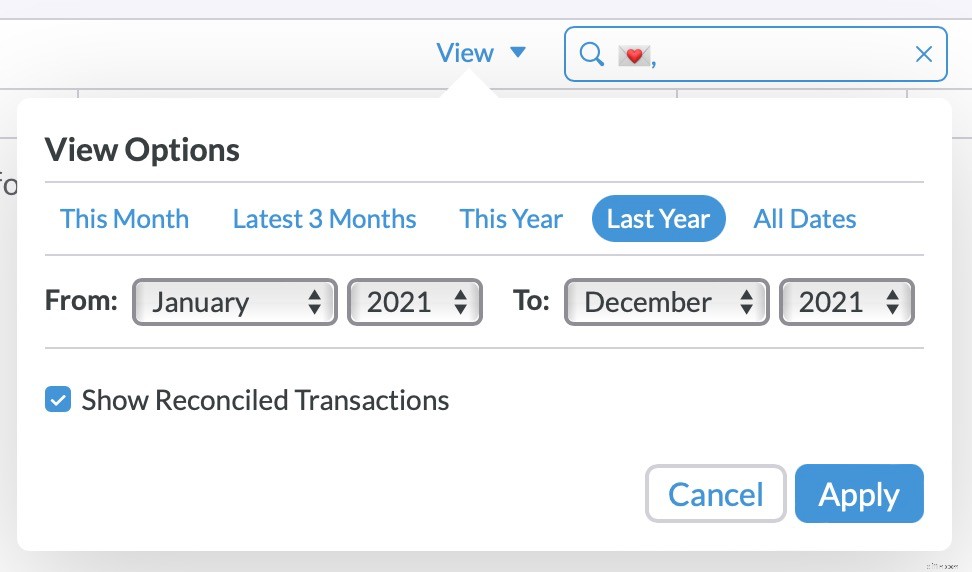
- In the search field, search for the name of the category, payee, flag color, or memo “tag” to bring up all transactions categorized to it.
- You can also filter those results under View to narrow down to a specific time frame.
- Once you have searched and filtered your transactions, select all applicable transactions using the Select All option.
- Then, click on the name of your budget in the upper left corner, and choose the Export # Transactions option.
To export a report:
- Log into YNAB on your desktop computer.
- Click ‘Reports’ on the left-hand side of the screen, which takes you to your ‘Spending’ report. (To switch to your ‘Net Worth’ or ‘Income v. Expenses’ report, click its name at the top of the screen.)
- Click ‘Export’ on the upper right-hand side of the screen.
- Click ‘Export’, again, to download the file.
Once you’ve downloaded your data, the sky’s the limit. Make tax time (and your accountant’s life) easier with a neatly organized spreadsheet that covers all of your financial incomings and outgoings.
And, if you DIY your taxes, dig through your data more efficiently and save yourself some time for something a little more enjoyable!
Know someone who needs some financial organization in their life for tax time and beyond? Tell them about YNAB’s 34-day free trial!
-
Top Online Brokers for Stock Trading in 2024 - Commission-Free Options
Update: Several major brokerage firms have recently announced they will no longer be charging commissions for standard US-based stocks and Exchange Traded Funds (ETFs). We have updated our rankings ba
-

Best Crypto Banks: Seamless Bitcoin Transactions & Services
Crypto-friendly banks leverage leniency in cryptocurrency transactions and bitcoin tradings.To begin with, cryptocurrencies were created as a substitute for banks with the aim to be a reliable and tru
budget
- Retirement Plan Tax Preparation Checklist: Maximize Tax Savings
- Betterment Review 2024: Is Automated Investing Right for You?
- Understanding Forex Trading: A Beginner's Guide to Global Markets
- Start Investing Free: A Beginner's Guide to Online Accounts
- Understanding Digital Options: Risks & Realities
- Free Budget Template: Simplify Your Personal Finances
- Simplify Tax Season with Mint.com: 5 Helpful Features
- Batch Cooking: Save Time & Money with Monthly Meal Prep
- MaxRewards Review 2024: Is It Worth It? | Millennial Money
-
Easy Meal Prep Ideas: 40+ Recipes for a Stress-Free Week
This article may contain links from our partners. Please read how we make money for more info.You might be thinking meal prepping takes way too much time and effort. Well, luckily there are solutions ...
-
Tax Fraud Jail Time: Penalties and Sentences in 2022
Not paying taxes because you don’t have to (exempt for whatever reason) and not doing so because you don’t want to are two completely different things. The latter could ev...