
Protect Your Business: The Critical Importance of Website Backups
Website backups are the insurance of online business.
You don’t think about them until you need them — but when you need them, they can literally determine the course of your business’ life.
We often hear of major data breaches on the news, but data loss is just as common, if not more so, and includes any incidents which render your data inaccessible or unusable. Both can lead to downtime of your website and other business-critical systems.
In their 2018 survey of IT professionals, Carbonite discovered that
There’s a reason why those of us in the cybersecurity business often say that there are two types of people: those who have lost data, and those who are about to lose data.
Whether the data loss comes from a malicious hack, a disgruntled contractor, or human error, online businesses should have a recovery plan in place before they need it.
If you’re an online retailer, your website is the heartbeat of your business.
If customers can’t access your website, or it’s not functioning properly, it will directly impact your revenue and your reputation with them.
So how do you ensure that your website data is safely backed up and accessible in the event that you need to restore it?
Here are the basics every ecommerce brand should know about backups.
What Are Website Backups?
A website backup is a copy of all your website’s data.
To ensure your online store is fully protected, backups should include your products, themes, categories, customer data, orders, pages, blog posts, inventory, gift certificates, and more.
The more data you can capture in your backup, the better.
There are four requirements to look for in your backup software system. A reliable backup should be:
- Regularly updated – as often as your website gets updated/changed.
- Complete – capturing as much data from your site as possible.
- Stored in a separate location/server from your website.
- Easy to access and restore when you need it most.
3 Consequences Of Not Backing Up Your Website
It’s hard to appreciate how disastrous a data loss can be to an ecommerce site if you haven’t lived through it.
Here’s a taste of what losing website data can mean for your business.
1. Losing your previous work.
Building an online store is a huge investment of time and effort.
Even with an ecommerce platform like BigCommerce taking care of the backend and professional themes at your disposal, you and your team will be spending countless hours updating, perfecting and maybe even rebranding your website.
You might have invested in hiring an agency to help you build your online experience and target your key customer base.
Without a backup, you only have your memory to rely on in case something happens to your website and you’re forced to rebuild it.
If a data loss of this magnitude happens to you, those hours of work you’ve already invested in go down the drain.
2. Revenue and customers lost from downtime.
If your website is down, you can’t sell products like you normally do.
This disruption could last anywhere from a few hours to a few days.
Knowing how much revenue your store generates on an average day and how many days it might take to recover your store will quickly tell you just how expensive that downtime really is.
The damage often extends beyond the downtime.
Every new website visitor is a potential repeat customer.
But when your store isn’t functioning properly, you are giving first-time visitors a negative impression of your brand.
They might think that this is a regular occurrence or that you’re not trustworthy and opt to never visit your site again.
Even your most loyal customers will be left with a bad impression.
3. Cost in time and money to recover.
When your website is down, the number one goal for your entire team will be to recover within less than 24 hours.
Without complete backups, it might not be possible to recover in a short period of time.
For instance, imagine the frustration and time required to manually rebuild all of your product pages from scratch.
Are BigCommerce Stores Backed Up?
The entire BigCommerce platform is backed up, but that doesn’t mean you’re not responsible for backing up your individual store data.
The way to approach ecommerce data security for any cloud-based tool is the Shared Responsibility Model.
You and your ecommerce service provider share the responsibility of keeping your data secure and available.
More specifically, BigCommerce is responsible for the software, infrastructure, and disaster recovery of the entire platform.
You, as a merchant on the platform, are responsible for password security, permissions given to users and third party apps, and backups of the data you put into your store.
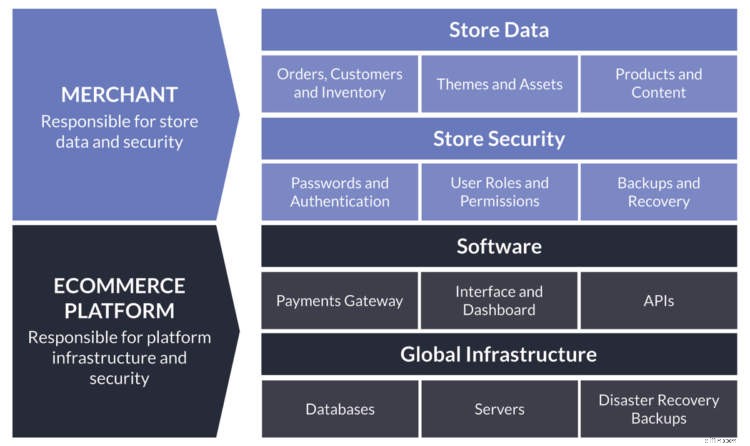
BigCommerce takes extensive precautions to ensure their infrastructure won’t fail and to maintain 99.99% service availability.
If anything were to happen, such as a meteorite destroying one of their data centers, they will recover the entire platform back to the way it was.
But their backups cannot be used to recover a single account back to a previous point in time or to recover just a selection of your products.
A backup of just your individual store will be much more granular and allow you the flexibility to restore everything or just some parts of your store to a previous point in time.
There are backup plugins and automated services like Rewind which we discuss in this article that make it simple to set up backups of your BigCommerce store.
-

Top 10 E-Commerce Website Builders for Small Businesses in 2024
It’s a great time to launch your online business,
-

Unlock Business Success: 5 Proven Strategies from Freelancers
Freelancing may be the employment model of the future. Companies are regularly looking to outsiders to fill specific needs and skillsets, and savvy freelancers are earning a living working with a mix
Business
- Cyber Insurance: Protecting Your Business from Data Breaches
- Protect Your Retirement: Understanding the 26(f) Program
- Wedding Liability Insurance: How It Can Save Your Day
- Commercial Casualty Insurance: Protecting Your Business from Liability Risks
- Business Insurance Consulting: Reduce Costs & Protect Your Business
- Business Travel Savings: Proven Hacks to Reduce Costs
- Boosting Finances: Financial Strategies for Micro Businesses
- Monetize Your Instagram: A Guide for Businesses
- Static Websites for Business: Benefits, Cost & Setup
-
 Understanding COGS: A Guide to Calculating & Improving Profitability
The Cost of Goods Sold – also referred to as cost of sales or cost of services – is the total of all costs incurred in creating your product or services. It does not include indirect expenses such as ...
-
 Top 7 Squarespace Alternatives for Businesses in 2024
Squarespace is a leading website management platf...