
Data Security for Remote Workers: Expert Tips & Best Practices
Data security is a hot-button issue right now, and for a good reason.
And in our digitized world, remote workers bear a greater risk when it comes to being hacked.
So instead of giving generic advice about “security,” I want to show you some ways you can secure yourself and your livelihood in the years to come.
This includes using the best remote work tools to work with your team while ensuring your data is secure.
To start things off, let’s look at the current state of data security.
The Importance of Secure Data
Whether we like it or not, cyber attacks are prevalent these days.
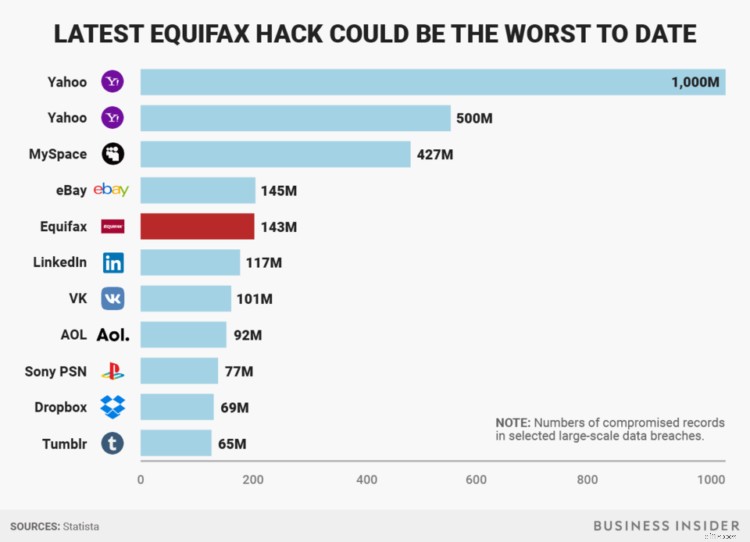
Just in the last few years, we’ve had the Equifax leak which lost millions of US citizens’ data.
(Image Source)
When half of an entire country’s personal data is breached, that should tell you something about your need for security.
But to make matters worse, even social media is starting to feel the sting of data leaks and misuse.
Facebook has been under the microscope due to the recent revelations about their dealings with Cambridge Analytica. It’s reported that more than 50 million users had their data compromised.
So now even the places we imagined safe are being used against us. What can we do?
First, it’s important to simply acknowledge that digital security is more important now than ever. You must ensure your security measures up, especially when dealing with customer and employee data.
The National Institute of Standards and Technology, or NIST, draws our attention to the fact that almost everything about modern life is dependant upon the billions of lines of code that make up the Internet of Things.
These lines of code connect us with everything from our dishwasher to high-tech military systems.
This means anyone with the know-how and an opportunity can hack your information, putting your livelihood and your employer’s credibility at risk.
And this is about more than just security. It’s about a remote worker’s ability to generate and maintain loyalty to digital brands.
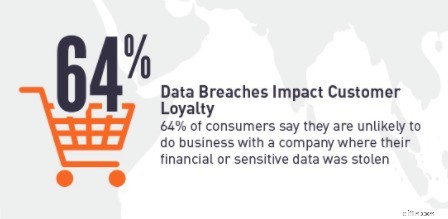
SafeNet recently shared that customer loyalty is irreparably damaged when a data breach occurs.
(Image Source)
That means that brands with remote teams not only have to worry about what’s happening on their own premises, but also off-premises.
For example, it’s harder to track time off and work breaks when remote teams aren’t physically in the office. Companies need to use a tool to manage employee time off, and couple this with manager check-ins in order to maintain time off allowances.
By extension, remote workers carry that same responsibility. They are a brand in themselves.
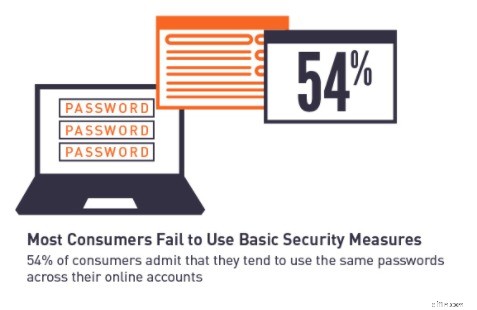
And to make matters worse, most people don’t use good security measures these days.
(Image Source)
We have a severe issue here. It’s an issue that needs to be addressed, and not in a superficial way.
So let’s take a few moments to look at ways you can keep your data safe from prying eyes, starting with some lousy password habits.
Lesson #1: Use a Password Manager.
Let’s just say it from the start. No one likes trying to keep track of their own passwords.
And no one likes trying to come up with a new password every time they are asked to.
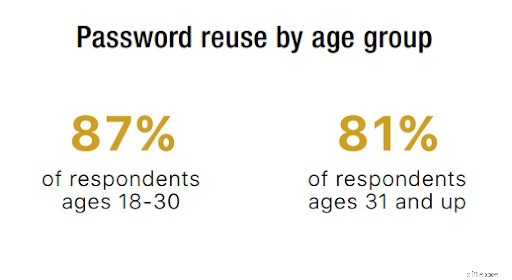
Which means that password reuse is a dangerously high trend:
(Image Source)
Almost nine in ten people under the age of 30 are reusing their passwords on a regular basis.
That means for the majority of us, if one password were discovered, then all of our data would be at risk.
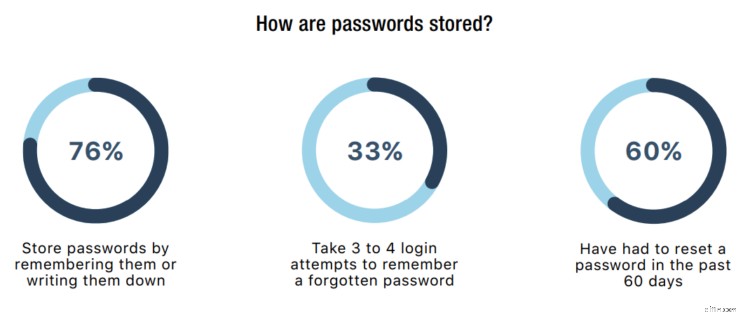
To make matters worse, the ways we do store and recall our passwords are pretty abysmal too:
(Image Source)
These statistics are eye-popping when you think of the implications. More than half of us reset a password every 60 day period.
And for the ones that do write our passwords down, we now have to keep a physical record safe from theft or harm.
That means that the likelihood you could be hacked hinges on your recollection of a few select passwords and how well you can keep them secure.
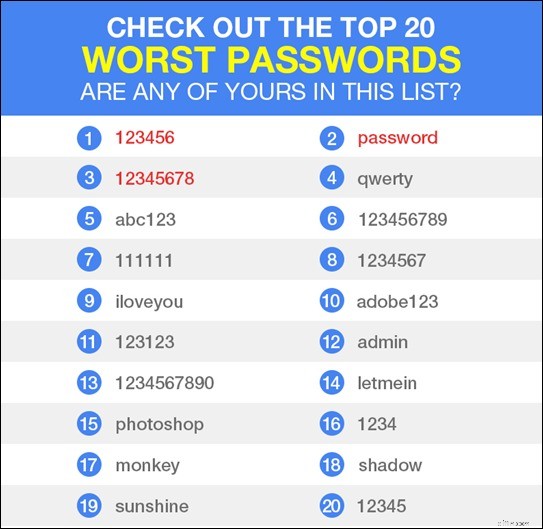
But we’re not even done with the bad news. Worse yet, plenty of people rely on the same passwords that are well known to hackers:
(Image Source)
This physically hurts me to think about, because so many remote workers are playing a reverse lottery that could sink their lives beyond repair. It’s not a game you want to play, much less win.
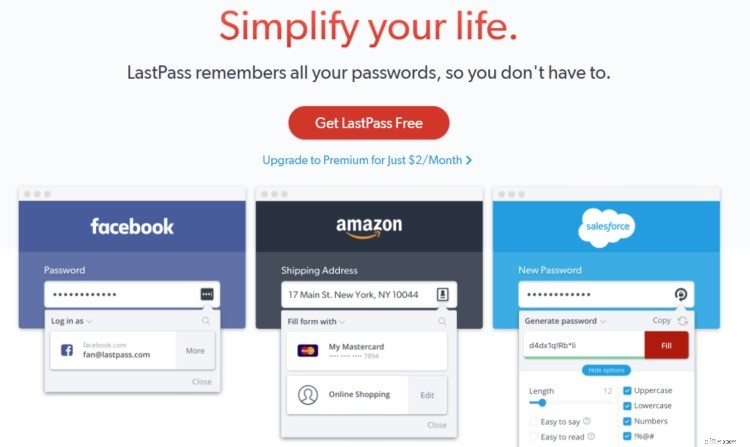
That’s why I strongly recommend using a password manager like LastPass.
(Image Source)
This type of service is great for workers who have too many passwords to remember but still want a secure option that lets them log in.
It works by letting you save passwords in an encrypted vault and then requiring a master password for use.
It will even help you generate new passwords that are virtually uncrackable.
They have a basic or a premium service that lets you store and easily use passwords on a variety of websites, as you can see in this screenshot.
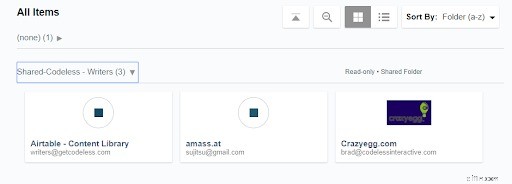
So you can either be secure for free or pay $2 per month and have a few extra bells and whistles.
Either way, you’ll be able to diversify your passwords and have a more secure digital lifestyle.
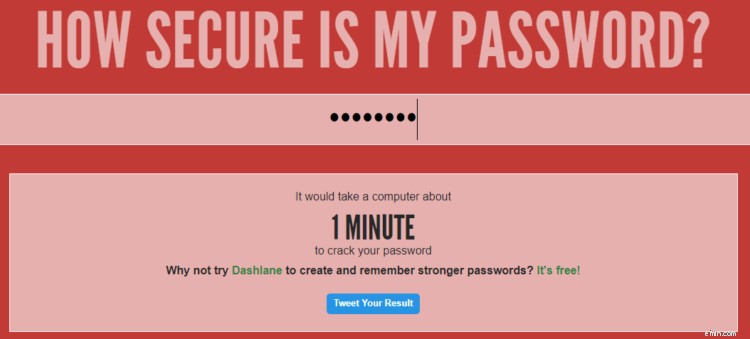
I also recommend checking out a tool like How Secure is My Password?
(Image Source)
As you can see, it lets you input your password and then tells you how quickly it could be discovered by a computer.
My abysmal example would be hackable in one minute. I probably shouldn’t use that password anymore.
Whatever you do, find a way to keep your passwords both varied and safe. You’ll be much more secure for the minimal effort it takes.
Lesson #2: HTTPS is Your Friend.
HTTPS is one of the classic signs to look for when browsing the web. It’s also now a major ranking factor on search engines. If you run into a site that’s asking for personal information but doesn’t have one of these:

Then you’ll be flirting with risk and needlessly exposing your information.
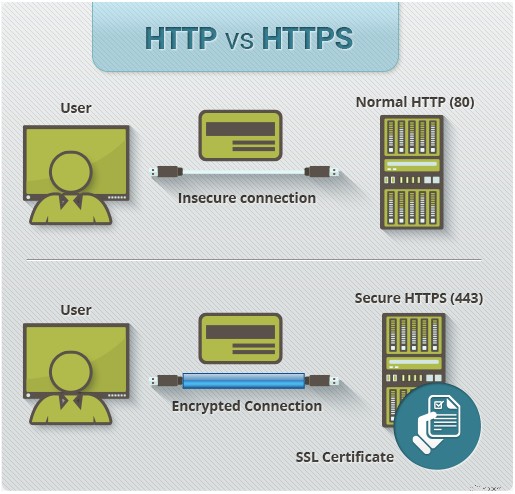
To help you understand how HTTPS works, InstantSSL shared this helpful graphic that encapsulates the entire process.
(Image Source)
Essentially, HTTPS just adds a layer of protection to your data while it’s transferred through the web. Whenever encryption can be on your side, it’s worth the effort to get it.
This process helps minimize the risk that someone can steal your information, especially if you’re looking at private or financial information.
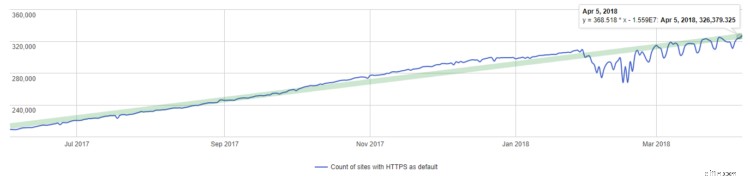
But the catch is that not every website is savvy when it comes to HTTPS. In fact, only a little over 300,000 sites currently use HTTPS as their default:
(Image Source)
This means there are thousands of more sites that aren’t using HTTPS when your data is involved. If you’re using WordPress, make sure you use fast and secure WordPress hosting.
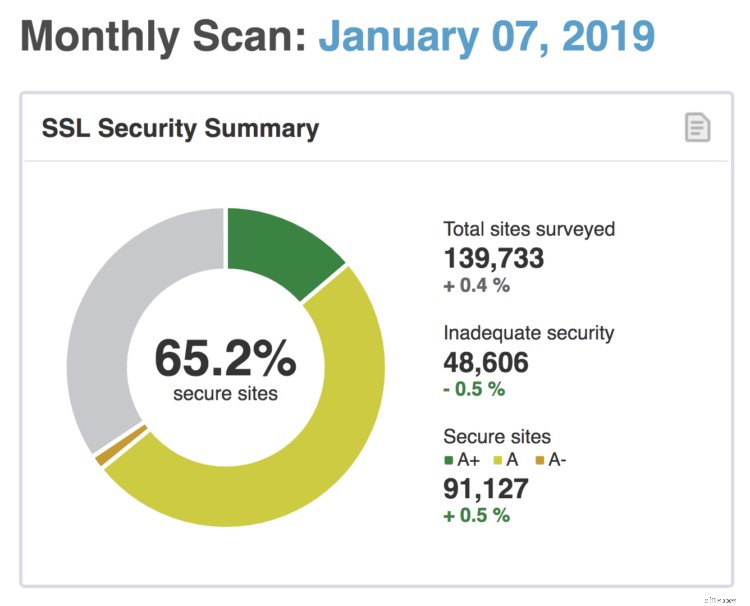
In fact, just 65.2% of the top websites according to Alexa use this basic layer of security:
(Image Source)
That’s probably not what you wanted to hear.
But thankfully, there’s a pretty easy solution to this mess that requires a few clicks. It’s an extension called HTTPS Everywhere.
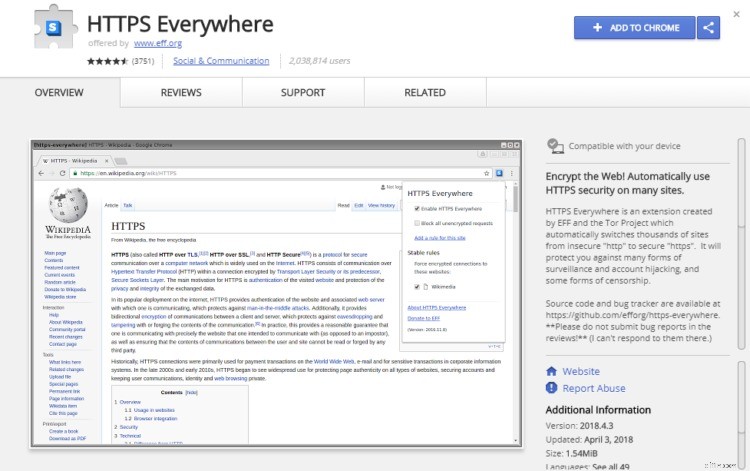
(Image Source)
All this extension does is turn ordinary HTTP sites into HTTPS versions. It essentially secures your movements at every turn.
While I wish every site were diligent enough to just use HTTPS themselves, that’s probably not going to happen anytime soon.
In the meantime, it pays to be prepared.
Take note of a lack of HTTPS on a site, and then don’t give them your information. Or, use a tool that keeps you safe.
Lesson #3: Monitor Your Finances Closely.
If you do somehow get hacked, the earlier you’re able to detect it the sooner you can fix your situation.
I know that dealing with finances on a normal basis is hard enough without the risk of getting hacked, but it’s still important.
And thankfully there are ways to keep track of your money that don’t require day-to-day actions. Automation is your friend here.
Many financial institutions allow you to set up notifications when transactions go through.
For example, my bank allows me to get text messages based on parameters I’ve set:
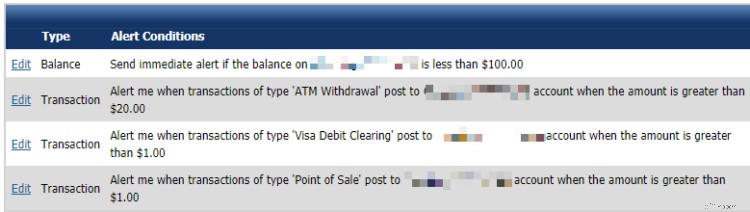
And this has been useful for peace of mind. It even helped me keep my friends from overdrafting my account once on a shared subscription service.
Tracking transactions like this might sound annoying, but it’s really not that intrusive.
It keeps you up to date on bills, helps you budget, and minimizes any potential damage that stolen information can cause.
But you can do more than just track transactions. In fact, I recommend layering your approach here.
Because let’s say you have multiple bank accounts, a few credit cards, and a loan. Tracking all of that by hand would be far too time-consuming.
Using a service like Credit Karma regularly can help you track multiple accounts in one convenient location:
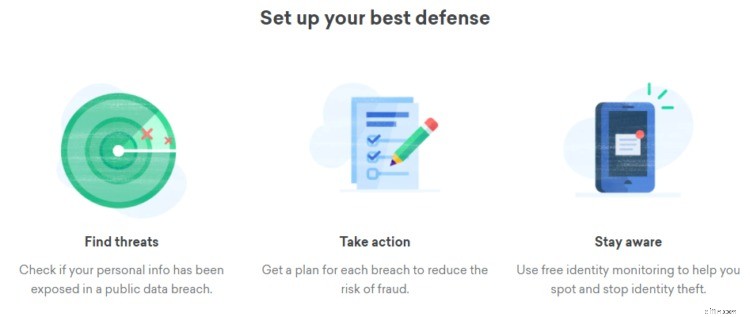
(Image Source)
It’s also great for helping you secure your finances in other ways, but my point here is about security.
Fraudulent activity will impact your credit score and show up in a service like Credit Karma, which makes it a good app to have on your phone.
All it takes is five minutes once a week. There’s really no reason not to use the service.
Your finances will be more secure, and you’ll be able to sleep better at night with that knowledge.
-

Understanding Cryptocurrency Security: Risks and Best Practices
Cryptocurrencies like Bitcoin and Ripple changed the world in more ways than imaginable. Though they bring numerous benefits to the economics of finance, they attract a lot of attenti
-
Protect Your Data: Lessons from the WannaCry Ransomware Attack
With the news of a new ransomware attack breaking last week, we are yet again reminded just how important it is to keep your data safe and just how vulnerable our computers can be to hackers
Business
- Social Security Future: Debunking Common Millennial Misconceptions
- Understanding Blockchain: Lessons from Wikipedia's Approach
- Jay Leno's Financial Secrets: How to Build Wealth & Save Money
- Understanding Student Loans: What High Schoolers Need to Know
- Financial Wellness: Applying Health Principles to Personal Finance
- Unionization for Workers: Understanding Your Rights & Options
- Scaling Your Business: Lessons from Local Pizzerias
- Retail History & E-commerce: Lessons for Modern Success
- Enneagram & Money: Understanding Your Financial Habits
-
 401(k) Mistakes: Avoid Costly Errors & Maximize Retirement Savings
A 401(k) account can be a surprisingly powerful aid in securing a financially sound retirement, particularly if you’ve been making annual contributions, and especially if your employer has been...
-
 Retirement Healthcare Costs: Strategies for Affordability
Credit: Miguel Á. Padriñán via Pexels One of the biggest retirement costs that you need to think about is healthcare. It’s expensive, and it’s unavoidable — especially when you’re in your golden yea...