
PayPal Debit Card: How to Apply & Use Your Card
In addition to using your PayPal account online, you can get a PayPal Debit MasterCard that can be used anywhere MasterCard is accepted. It can also be used at ATMs to withdraw cash from your account.
Requesting a Card
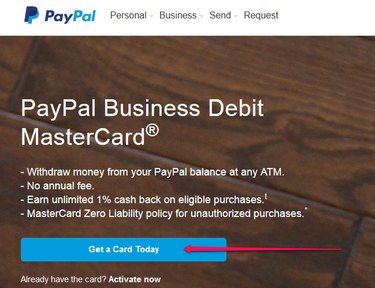
To request a PayPal Debit MasterCard, log in to your PayPal account and go to Tools. Click Get a Card Today after the start page opens.
Tip
PayPal refers to the debit card as a Business Debit card whether your PayPal account is a personal or a business account.
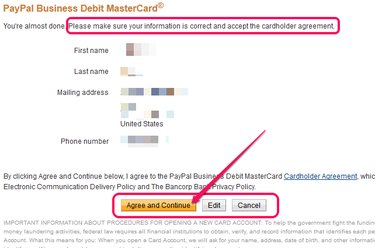
Verify your name, mailing address and phone number. If changes need to be made, click Edit and follow the prompts to update your information. After verifying the information, click Agree and Continue.
Tip
You may be asked to upgrade to a business account during the registration process. Upgrading only applies to the debit card and not your overall PayPal account.
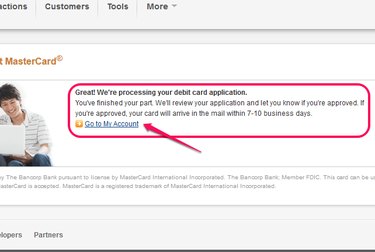
A confirmation page lets you know that the request is being processed. Upon approval, you can expect to receive your card in seven to 10 business days.
Activating Your New Card
When you receive your card, activate it online by visiting your PayPal account page and following the prompts. Alternatively, call the toll-free number provided on the card. Choose a four digit PIN to complete activation.
How it Works
After activation, the card can be used anywhere MasterCard is accepted. Swipe the card just like any debit card. Enter your PIN for most purchases. It can also be used online at websites that don't accept PayPal. Choose the credit card option at checkout.
Benefits of a PayPal Debit Card
Having a PayPal Debit Card gives you the option to use your PayPal account at land-based stores and online at websites that don't accept PayPal. You benefit from all the privacy protections of your PayPal account.
Tip
Just like your online PayPal account, any of your connected bank accounts can be designated to fund purchases made with the PayPal Debit Card.
Drawbacks to a PayPal Debit Card
Having a PayPal Debit Card isn't the same as having a line of credit or a bank account. There is no overdraft protection if you try to charge an amount greater than what you have in your account.
Tip
For added protection, link a bank account to your debit card as a backup payment method if you don't have enough in your account at the time of a purchase.
-
Combining Prepaid Debit Cards: A Comprehensive Guide
Buy products with multiple debit cards. Prepaid debit cards work just like a standard debit card. However there is a preset limit of money placed onto the card. If you are purchasing a produc
-

Debit Card Status: How to Monitor Transactions & Ensure Security
Debit cards look like credit cards, but are tied directly to your bank account. Debit cards are a great way to link your bank account(s) with a physical card, and can be used in nearly all ca
credit card
- Decoding Debit Card Numbers: What They Really Mean
- Credit Card Cash Advances & Debit Transactions: Fees & Interest Explained
- Adding Backup Funding to Your PayPal Debit Card: A Quick Guide
- Activate Your PayPal Debit Card: A Quick & Easy Guide
- Renting a Car with PayPal Debit Card: What You Need to Know
- Capital One Debit Card: Application & Replacement Guide
- Debit Card Age Requirements: How to Get a Debit Card as a Minor
- Debit Cards: A Comprehensive Guide to Getting Your Own
- Debit Card Age Requirements: What You Need to Know
-
 Credit Cards with an ITIN: Your Options & How to Apply
Prepaid credit cards have the Visa or MasterCard logo just like a regular credit card. An individual taxpayer identification number (ITIN) is issued by the Internal Revenue Service for people...
-
 Using Prepaid Cards with PayPal: A Quick Guide
Any type of Visa, MasterCard, Discover or American Express credit or debit card, including prepaid credit cards, can be used with a personal or premier PayPal account and used as a payment method. Cre...