
YNAB Review 2025: Comprehensive Analysis & Is It Worth It?
-
 by
Fiona Smith
by
Fiona Smith
- Updated April 2, 2025

Disclosure: This post may receive compensation from partners listed through affiliate partnerships, at no cost to you. This doesn’t influence our ratings, and the opinions are our own. Learn more here.
You Need A Budget (aka YNAB) is one of the most popular – and arguably one of the best – budgeting tools, especially for new budgeters.
In fact, YNAB claims that on average new budgeters save $600 in their first two months and more than $6,000 in their first year.
If you are looking for a budgeting tool to transform your financial situation for the better, then YNAB could be the right option for you.
Keep reading.
Overall Rating
Rated 4.6 out of 5
You Need a Budget (aka YNAB) is one of the most popular and well-known budgeting applications. If you find you’re having trouble with saving money and don’t know where else to turn, YNAB might do the trick, since first time YNABers claim they saved $600 within their first 2 months of using the app and saved more than $6,000 within the first year of using the app.
Before we jump into the nitty-gritty of this You Need A Budget review, let’s take a big-picture look at YNAB and the pros and cons:
Excellent spend tracker
No reporting
Free for 34 days
Does not cover overall financial health
Easily syncs financial information
Does not track your investments
Focuses on all things budgeting
No phone customer support
The ultimate goal of YNAB, based on their website, is for you to:
"Gain total control of your money".
In fact, YNAB was founded by a young accountant who wanted to develop an application that would help him and his new wife better budget for their expenses.
After seeing almost immediate and wild success with the software, the young accountant decided to take YNAB to the next level and that’s where we are now.
Below is a quick overview of what you can expect when you sign up with YNAB:
Flexibility
⭐️⭐️⭐️⭐️⭐️
Safety Features
⭐️⭐️⭐️⭐️
Usability
⭐️⭐️⭐️⭐️
Cost
⭐️⭐️⭐️⭐️
Customer Service
⭐️⭐️⭐️
Regarding customer service, it appears like most disgruntled customers mention that they would like to speak to a service rep via phone, but there is no apparent option to chat with someone using the phone.
Although you will have live chat as an option with YNAB, it may not always be the best option, depending on the situation you are trying to resolve.
YNAB Review Verdict
If you’re someone who is struggling with budgeting and you are committed to making a difference in your financial life, then YNAB may be the perfect platform for you to change your current financial situation for the better.
You Need A Budget is 100% dedicated to budgeting and improving your overview of your inflow and outflows.
Many YNABers claim that they were able to save more than $6,000 in their first year of using YNAB (which translates to saving around $500 per month), which tells me this app is worth the money.

The Bottom Line:
YNAB is budgeting software that will undoubtedly help you improve your budget situation – if you’re committed to the cause (i.e., YNAB is a long-term solution). Beware that YNAB’s interface may not be as intuitive as other budgeting software programs, so you may need to get used to YNAB first. If within 34 days, you still don’t enjoy the program, you have not lost a single cent, because YNAB offers you a 34-day free trial.
What are the YNAB Rules?
For those of you who are not 100% familiar with YNAB, it should be said that the YNAB basic strategy is built upon 4 fundamental rules, which I’ll describe to you below.
Rule #1: Give Every Dollar A Job
Every dollar serves a purpose and should not be spent without a plan.
Rule #2: Embrace your True Expenses
Prepare for larger ticket (and recurring) expenses ahead of time.These could include holiday expenses, vacations, etc.
Rule #3: Roll with the Punches
It’s likely you’ll overspend in some categories while spending less money in other categories.Be flexible with your spending plan, as life will throw you some curveballs.When you overspend in 1 area, you’ll have to lower your expenses in another.
Rule #4: Age your Money
The ultimate YNAB goal is to help you live off of money that is from last month’s salary, so you are not living paycheck to paycheck.
And those are the 4 basic rules that YNAB uses as its foundation to help you:
- Get out of debt
- Save more money
- Improve your finances
- Stop living from paycheck to paycheck
But remember, YNAB can only do so much for you.
The application won’t make a difference in your financial picture if you don’t put in the work and if you are not committed.
YNAB Community
The YNAB community includes:
- YNAB Blog
- YNAB Forum
- YNAB Podcast
- YNAB YouTube
YNAB, it seems, has evolved from a single budgeting app to becoming more like a community of like-minded people.
YNAB Features
YNAB has some pretty neat features outside of the mobile app as well.
YNAB can be used either as a desktop application or as a mobile application.
I love that I can access YNAB both ways because believe it or not, I actually use my laptop most of the time.
Check out some of the cool features offered by YNAB, below:
Seamless Sync
If you make a change to your YNAB account on your desktop, then the change will be transferred to your YNAB mobile device.
Direct Import
You can directly import bank transactions to your YNAB account.
Goals
YNAB customizes your budgeting recommendations based on your financial goals.
YNAB Category Inspectors
YNAB will notify you with either a:– Red light (overspending)
– Green light (you can still spend)
– Yellow light (approaching spending limit)These lights will appear on your budgeting categories and will serve as visual cues.
The YNAB Inspector
This feature will give you a quick glimpse into whether you have enough money budgeted for an upcoming expense.
The fact that YNAB uses many visual cues can be a total game-changer, especially if you are a visual learner.
Below are some YNAB key features that you should know about before reading further:
Founded
2004
Estimated Employees
109
Average Savings in First 2 Months
$600
Average Savings in First Year
$6,000+
Retirement Planning Feature
No
Bill Payment Feature
No
Number of Banks YNAB can sync with
12,000
Customer Service
Available by:
– Live chat
– Email
Not available by:
– Phone
Country Availability
Worldwide
One of the cons could arguably be that YNAB does cost money, I strongly believe because you can save more than $6,000 within the first year, the app essentially pays for itself.
You should consider YNAB if:
- You struggle with budgeting
- You need some guidance with budgeting
- You don’t know where your money is going
- You don’t know how much you spend each month
- You want to change your financial picture but don’t know where to start
If you are 100% committed to flipping your financial picture and sticking with a new budget, then YNAB very likely can help you out.
How to Set Up a YNAB Account [Step-by-Step]
For those of you who are wondering how to set up a YNAB Account and how the actual YNAB dashboard looks like, I’ve outlined a simple, step-by-step guide for you below with detailed screenshots.
Remember, YNAB is free for 34 days, so even if you don’t plan to continue the service, I think it’s 100% worth testing out the app.
Let’s get started.
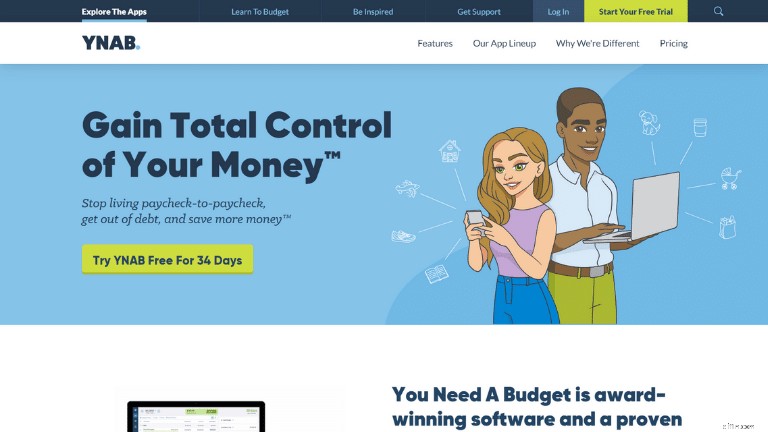
First, you’ll want to head to the YNAB home page.
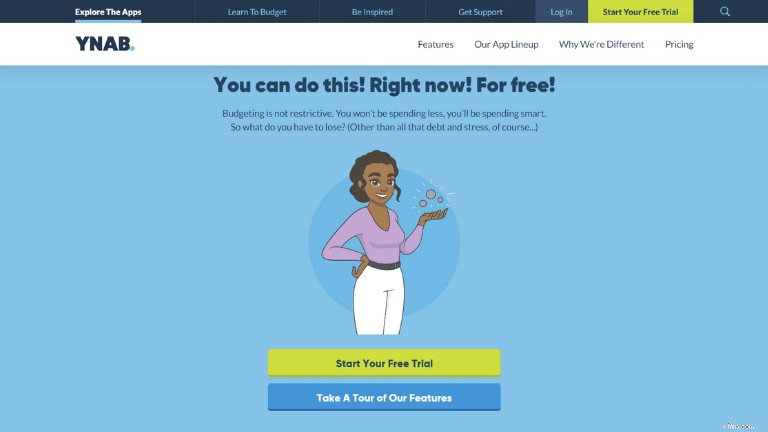
Next, you’ll want to click on the “Try YNAB Free for 34 Days” button.
I love that you can try YNAB out for free and not have to pay a single cent.
If you love the app, great – because you’ll save a lot of money.
If you don’t like the app, great – because you won’t have to pay a cent.
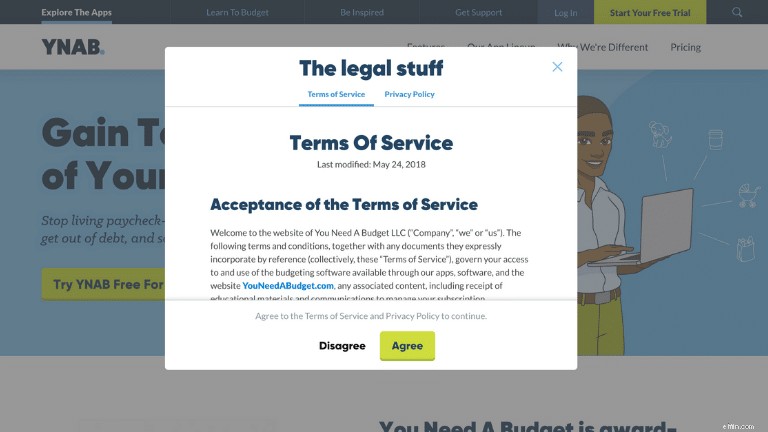
Because I prefer the old-fashioned way, I’ll sign-up for my free trial using my email address.
Now, it’s a bunch of disclaimers that you have to agree to.
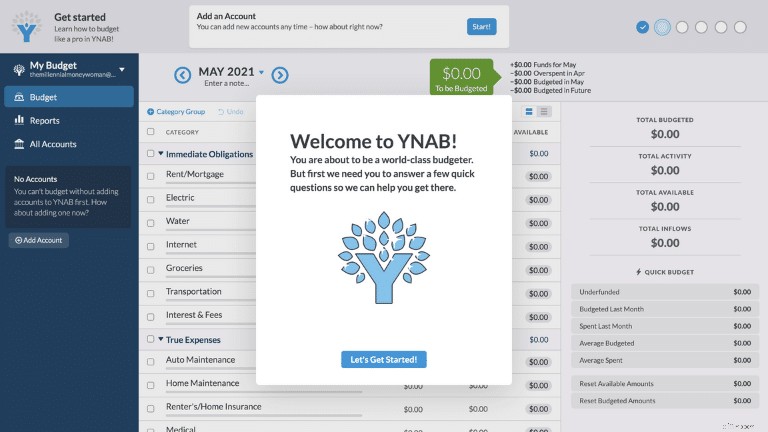
And BOOM!
After I hit the “agree” button, my YNAB portal is opened directly for me to start using and budgeting.
I’m not going to lie, that was the fastest app sign-up process I’ve ever done.
It took me about 30 seconds to set up my free YNAB account.
After you’ve confirmed your email address, it’s time to get back to your YNAB dashboard.
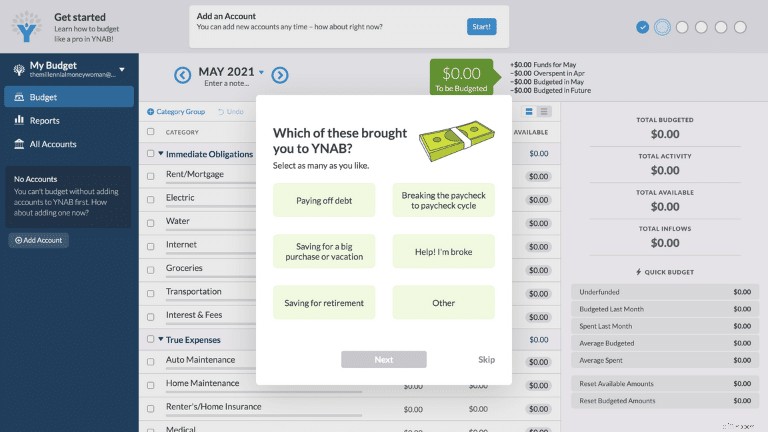
Now, it’s time to answer some basic questions – there are just 2 of these pages – (although you can technically skip this part).
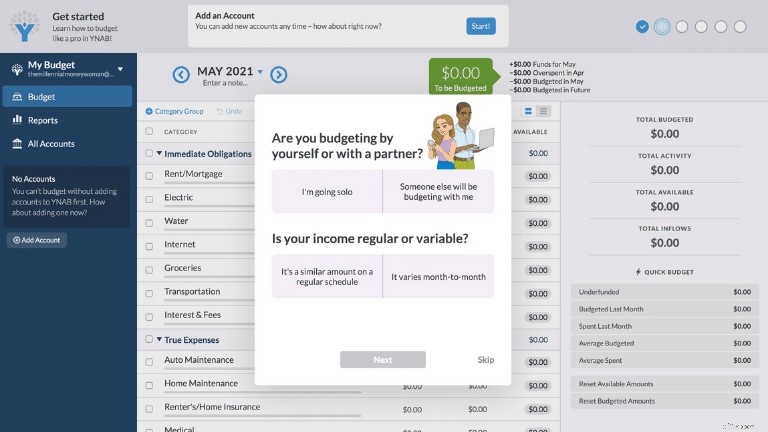
Personally, I think these starter questions are great because you have the chance to figure out a bit more about yourself and your financial situation, too.
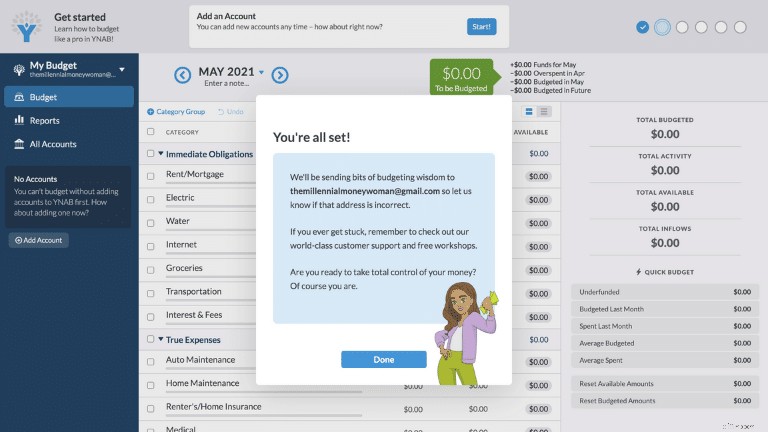
After you’ve answered these questions, you’re done and ready to dive into YNAB.
As you can see from the little screen inset, when you sign-up to YNAB, you’ll be receiving tidbits of budgeting and financial information sent to your email address.
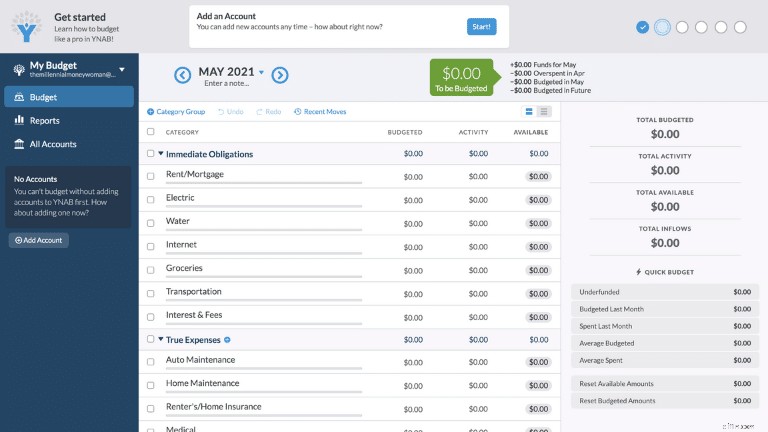
Here’s the full and unrestricted view of your YNAB dashboard.
From the first glance, yes, it’s a bit messy and it might seem a little overwhelming.
Now, let’s figure out how to add an account.
How Do I Add an Account with YNAB?
One of the first steps you’ll want to take, is to sync an account with YNAB, so that the software can start tracking your income and your expenses.
In this case, you’ll want to hover to the top of the dashboard, where you see the title “Add an Account” and click on “Start!”
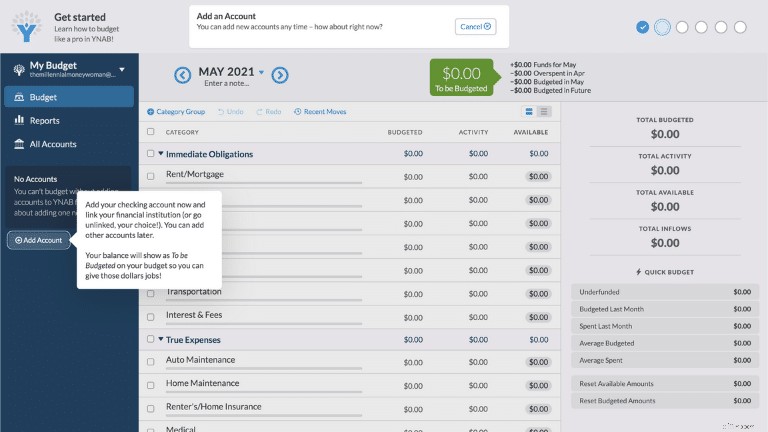
After you hit the start button, you’ll be directed to where you can actually add an account (which is in the left-hand column).
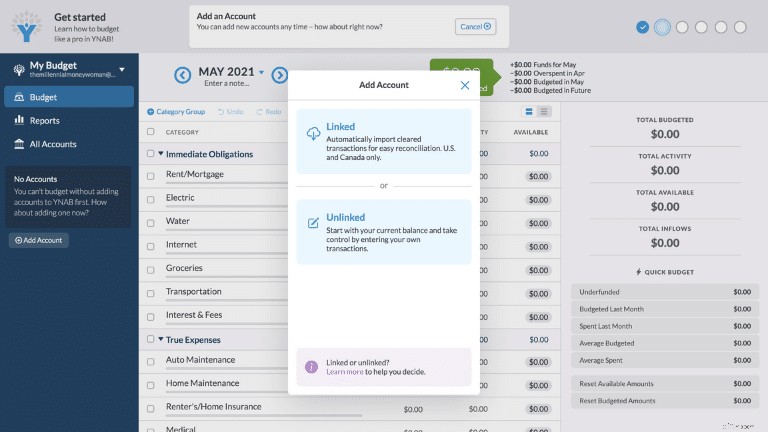
As you can see, if you want to add an account, you’ll have 2 options with YNAB:
- You can manually link your accounts
- You can automatically import your accounts
Although the automatic import may make things a lot easier in your life, if you are concerned about the safety of your personal data, you may want to opt for the unlinked (aka manual) route.
If you want to automatically link a bank account, click “Linked” and this is the screen you’ll see a pop-up:
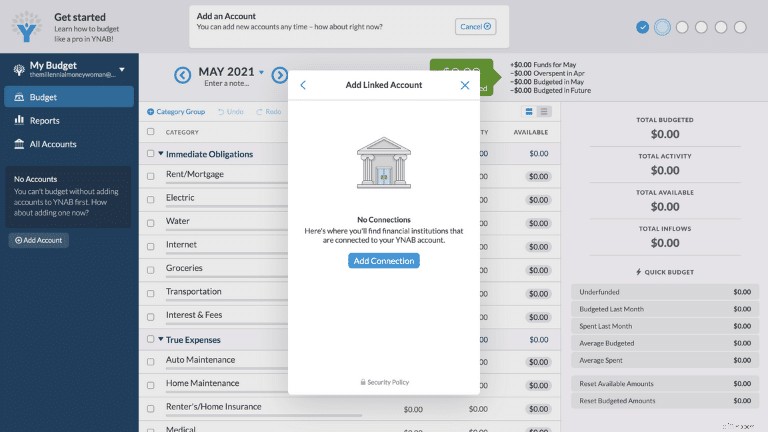
At this point, you’ll want to click “add connection.”
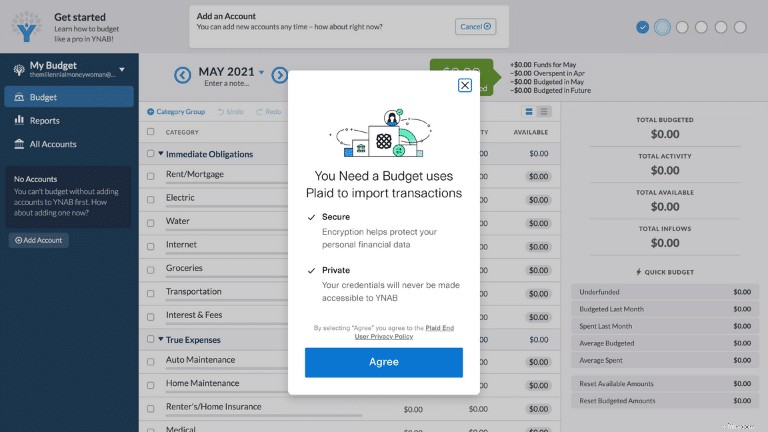
Here, YNAB explains that directly importing your information will be both secure and private.
Of course, that doesn’t guarantee that your personal data will be stolen, but it certainly is reassuring to see.
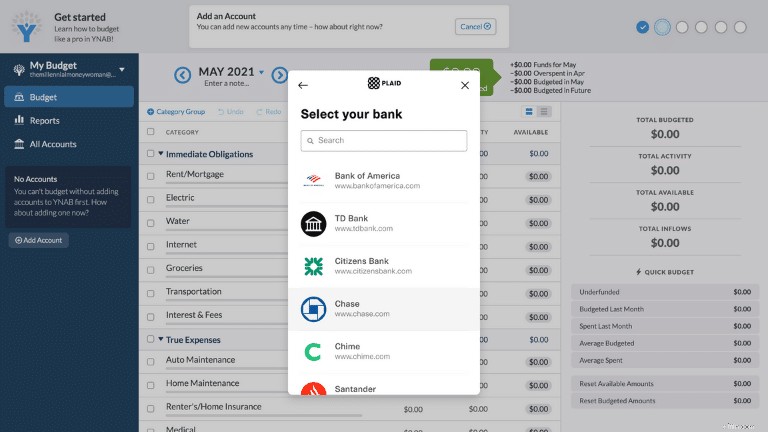
After clicking agree, this is the screen you’ll see.
YNAB is partnered with about 12,000 financial institutions, so chances are, your bank will be listed in this portal.
However, if you find that your bank is not listed, then you’ll likely have to manually input your information (and I’ll show you how to do that, later, too).
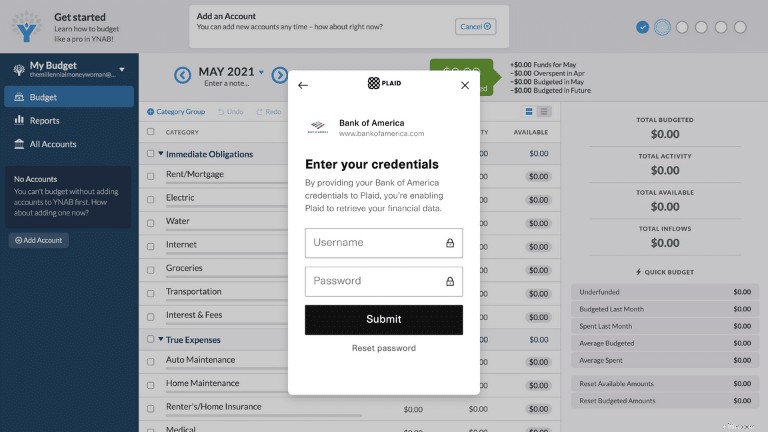
Let’s say you are a Bank of America user.
If so, you’ll want to input the same username and password to your Bank of America account and connect YNAB with your Bank of America account to pull your information.
Now, if you prefer to manually input your information, you’ll want to go back and click “Unlinked”.
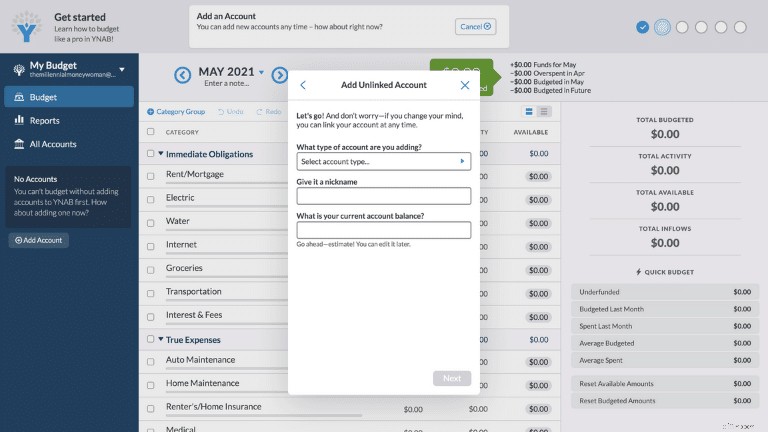
From here, you’ll have to select the type of account you’re adding to YNAB:
- Checking
- Savings
- Cash account
- Credit card account
- Line of credit (type of debt)
And you’ll also have to input whether the account is considered to be a/an:
- Asset (you own it)
- Liability (you owe it)
You will also have the choice to give your account a funny nickname and obviously the account balance.
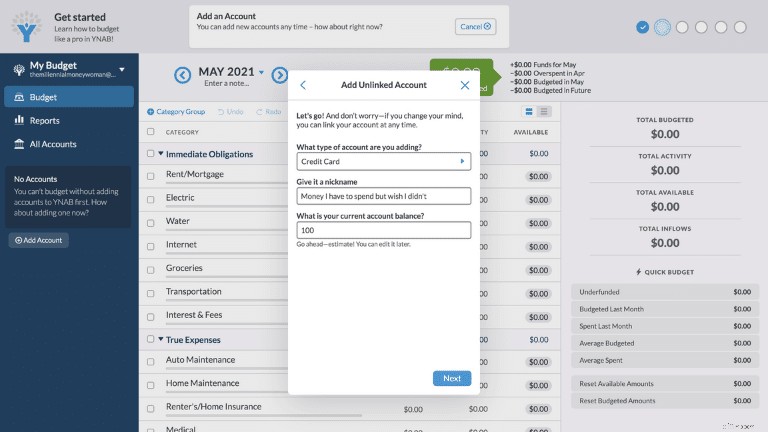
Here is a quick overview of the preliminary information you’ll need to input for unlinked or manually added accounts.
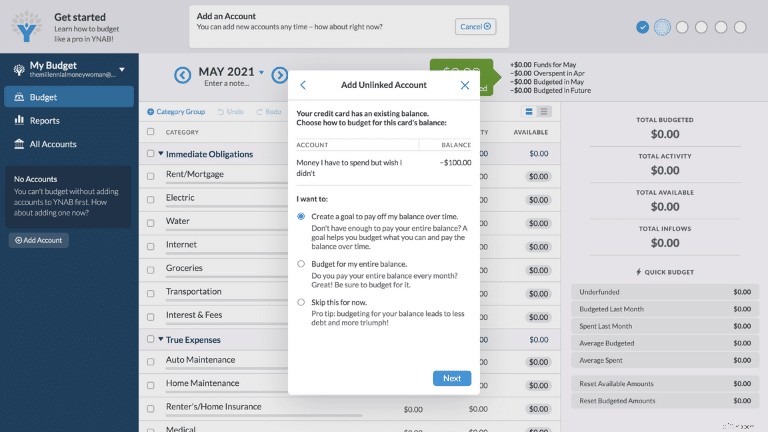
Next, you’ll have to indicate what your goal is for this account.
Your 3 options are:
- Create a goal to pay off the balance over time
- Budget for the entire balance
- Skip this step for now
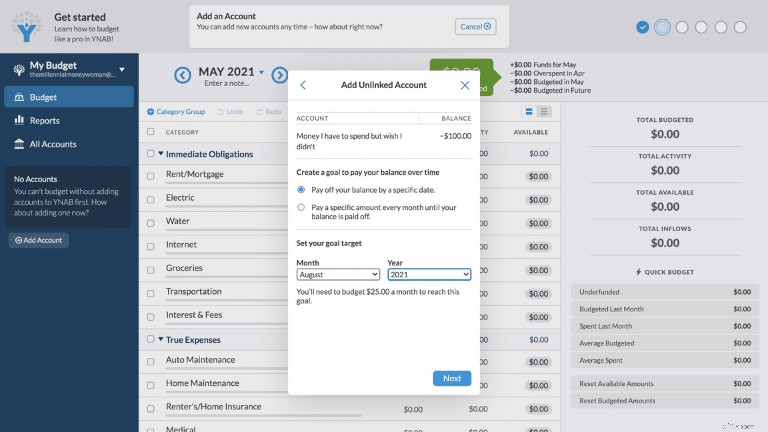
I also decided to set a target balance payoff date.
To be honest, I’m really digging how YNAB can customize your balances in such a nifty manner.
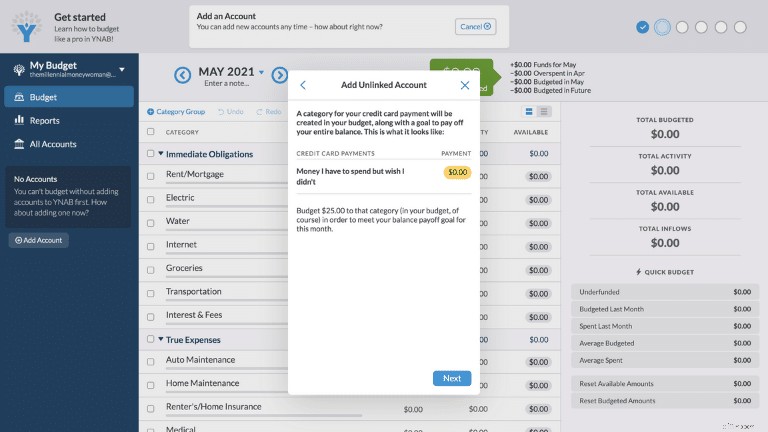
YNAB automatically calculates how much I need to start budgeting to pay off my credit card balance.
As you can see here, it looks like I’ll need to make a $25 payment per month to meet my target credit card balance payoff date on August 2021.
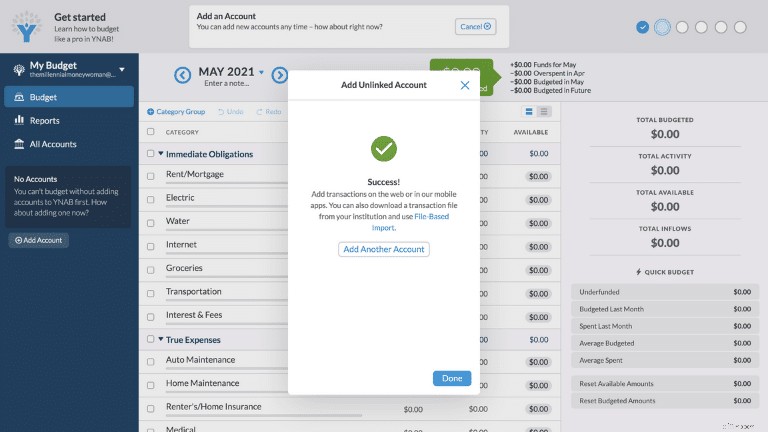
From here, you can decide whether you want to add another outside account or if you want to take a break and check out the rest of the YNAB portal.
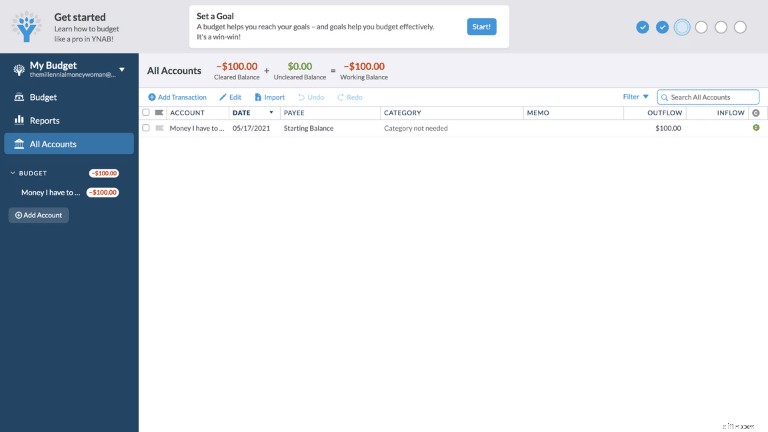
Now, when I’m back on the home screen of my YNAB portal and click on All Accounts (check out the column on the left), I see that I currently have a “working balance” of -$100.
Of course, that’s just 1 account, and I’ll have to make sure I manually update the rest of my accounts as well to create a full picture.
Once you have all of your accounts manually updated, it’s time to actually start your budget process.
I’ve created a fake budget outline, below, but you’ll see roughly what a budget in YNAB will look like.
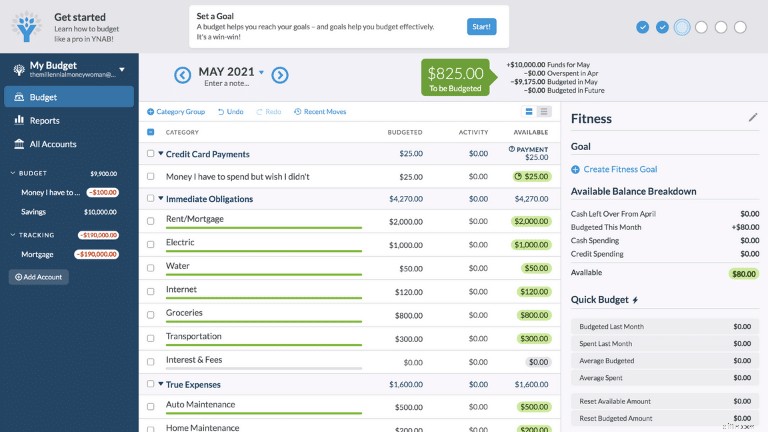
This is how a semi-finished budget in YNAB would look like.
There is a lot of customization when it comes to YNAB.
I do want to draw your attention to the “Goal” section, on the right-hand side of the screen.
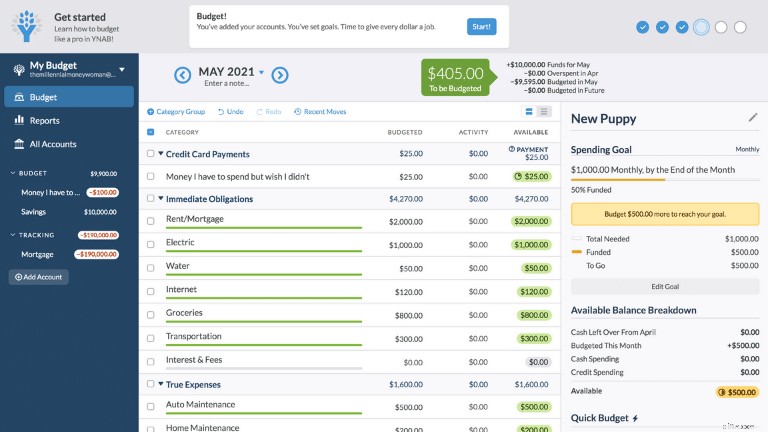
You can customize your spending goals, and you can see your progress on how much money you still have to save to accomplish your goal.
Now that you’ve prepared your budget, it’s time to schedule a transaction (aka you’re tracking every purchase, withdrawal, etc.).
The “schedule a transaction” circle (second to the right) will bring you to the “Savings Page” tab and the “Tracking” tab in YNAB (you’ll find these tabs on the left-hand side of the screenshot, below).
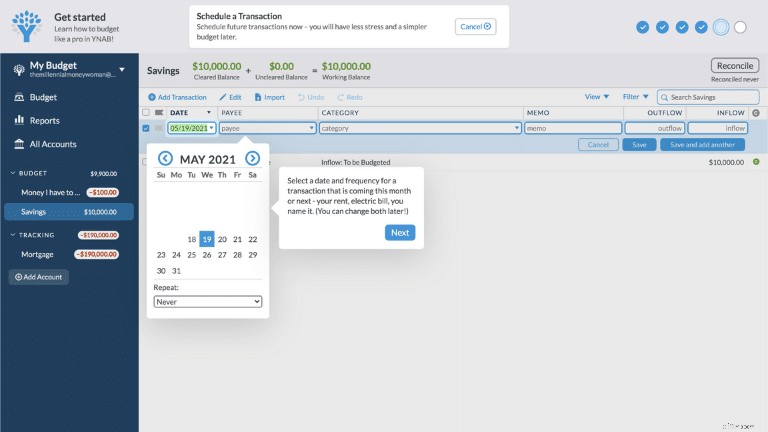
Here, you can select the amount of money you save (or spend), the frequency, the person you pay it to, etc.
There is a lot of up-front work with YNAB (aka making sure you categorize everything appropriately), but if you plan to use this application seriously, then this is a necessary step.
The last circle (all the way to the right) will show you how to input the move money process.
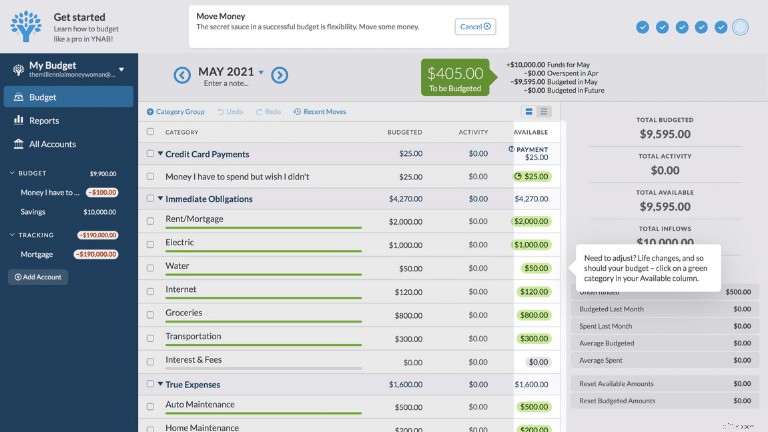
What the “move money” tab means is that if you overspend in 1 category, you can always adjust your spending.
Here’s a sample original budget:
$100
$100
However, you decided to go all-out on cheese and spent $150 (and not your budgeted $100).
With YNAB’s “move money” feature, you can easily adjust your budget and still avoid overspending in 1 category.
Here’s how your new budget would look:
$150
$50
This is an easy adjustment.
You still end up spending $200 on cheese and wine, but you just changed the amount of money that went toward your cheese and toward your wine.
Simple!
FAQs
Is YNAB legit?
YNAB is 100% legit. The budgeting app not only can change the way you spend money but it can also change the way you view money, with YNAB’s age-old rule, “every dollar has a job.”
If you know you need to cut back on your expenses, then YNAB is the app you need to try out now.
Is YNAB Secure?
YNAB does not view or store your bank credentials and YNAB relies on its partners (including MX and Plaid) to ensure your personal data is safe.
YNAB also uses Perfect Forward Secrecy, which encrypts your personal data.
However, if you still feel a little uncomfortable with the direct import option, then you can always manually update your budget information as well.
Is YNAB worth the money?
If you commit to using YNAB and follow the app’s recommendations, then one could argue that the app is certainly worth the money.
In fact, the average YNABer saves $600 within the first 2 months of using the app, and saves more than $6,000 in their first year!
So, I would say that paying YNAB’s monthly fee of $11.99 is certainly worth the money.
YNAB will help you:
- Save money
- Understand more about money
- Change your thinking about money
And worst case, if you don’t like YNAB you can always quit within YNAB’s 34-free day trial period. It’s a win-win situation.
How much does YNAB cost per month?
YNAB is free to use within the first 34-days of signing up. You can then either select to pay a monthly fee of $14.99 or an annual fee of $98.99 (you save $80 by paying the annual fee).
Is Mint or YNAB better?
If you are really struggling with your expenses and know you need to make a change with your spending habits, then YNAB is likely your top pick.
YNAB, although it does cost money, will guide you through every step and YNAB will very likely make a positive difference in your spending patterns, since YNABers claim they save more than $6,000 within the first year of using the app.
On the other hand, if you want a budgeting app that’s free, that tells you where your money is going, and that can give you some limited budgeting guidance, then Mint may be better for the job.
For those people who want to make a difference in their budgeting picture, you really should consider YNAB.
What’s so great about YNAB?
YNAB can make a real difference in your spending habits because:
- It offers excellent money education
- It encourages you to eliminate your debt
- It offers guidance on reducing your expenses
YNAB strictly focuses on budgeting, eliminating debt, and saving more money.
If you are seriously committed to improving your finances, then YNAB could likely do the trick.
YNAB Review: The Bottom Line
YNAB is one of the best budgeting applications – if not the best application out there.
At first glance, YNAB’s interface may be a bit overwhelming, because there is so much information, but YNAB offers a step-by-step guide (the 6 circles at the top-right of the dashboard) that helps YNAB users walk through the app with ease.
Although YNAB does cost money (either month-to-month or annually), the app does offer a 34-day free trial of users to test out whether they enjoy the app’s functionality.
YNAB is not a short-term budgeting solution.
YNAB will work wonders for those who are committed to the long-term.
That’s because:
- YNAB requires upfront work (categorizing)
- YNAB requires upfront time (sifting through your finances)
- YNAB requires a slight learning curve (getting used to the interface)
Again, that’s why you have a 34-day free trial to test the YNAB waters.
If you ask me, personally, I think YNAB has the potential to make a huge impact for the positive in your financial life – if you are committed to using the app.
Start now and your bank accounts will thank me later.
What were your thoughts when you first learned about YNAB?
Join 30,000+ People That Get My Weekly Tips via Email
Every Saturday morning, you’ll get 1 actionable tip to help you save more money, increase your income, and multiply your wealth 👇
No spam. Just the highest quality tips on the web.
Join 30,000+ others and get access to exclusive tips, strategies, and resources that I don’t share anywhere else 👇
-

China Intensifies Crackdown on Bitcoin Mining and Cryptocurrency Trading
China has signalled a deeper push against cryptocurrencies after its crackdown last week, this time targeting the process of cryptocurrency mining as well as exchange platforms. The country’s State Co
-

Rebuilding Credit After Bankruptcy: A 5-Step Guide
Bankruptcy can make you feel like you are totally off track with your finances. Going through the bankruptcy process is not the end of financial health and security. It may lead to considerable dist
Personal finance
- Essential Insights: What Real Estate Agents Want You to Know
- Retirement Planning Calculator: Estimate Your Retirement Savings Needs
- Child Tax Credit Deadline: Don't Miss Your September Payment - IRS Update
- The Power of Changing Your Mind: A Case Study in Success
- Wealth-Building Principles: Financial Rules of Successful People
- COVID-19 Pandemic & Poverty: 3.3 Million Americans Fall Below the Poverty Line
- Planning for Long-Term Care: A Comprehensive Guide
- 7 Proven Money Challenges to Boost Your Finances
- Understanding Trustees: Roles, Responsibilities & Fiduciary Duty
-
 2021 IPOs: A Comprehensive Overview of Recent & Upcoming Offerings
For a private company deciding to offer ownership shares to outsiders, the initial public offering (IPO) is the biggest turning point in its life. The IPO is when financial underwriters, inst...
-
 Vomma: Understanding Vega Sensitivity to Volatility Changes
Vomma is an option Greek that represents the sensitivity of vega to the change of the implied volatilityImplied Volatility (IV)Implied volatility – or simply IV – uses the price of an opti...