
Mastering Your Checkbook Register: A Step-by-Step Guide
How to Use a Checkbook Register. Learning how to use and keep up with a checkbook register is an integral part of balancing your checkbook. Keeping a checkbook up-to-date can give you a clear picture into your finances and help you save money by avoiding overdraft fees. Read the following tips to learn how to use a checkbook register.
Step 1
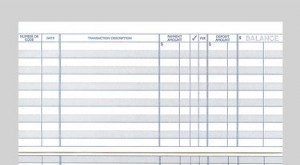
Write the dates for which you plan to keep the register on the front cover. Open your checkbook register. Note the transaction code ledger at the top of the checkbook register. There will be a number of abbreviations for transactions, including deposits, ATM withdrawals, check or credit card activity, electronic payments, automatic deposits, tax deductions and other transactions.
Step 2
Locate the part of the register under "Balance" meant to record your starting balance and write it down. The space to write the starting balance will likely be above the rest the other register lines or on the same lines as the column titles.
Step 3
Find the column meant to record your transaction type. Enter your check number or the transaction abbreviation. Enter the corresponding date.
Step 4
Move to the long line for the transaction type. Describe what type of transaction activity is being recorded. You may put down "Grocery Store," for example. Enter the amount you spent in the "Payment" or "Debit" column. List any associated fees if your register has a column for them.
Step 5
Subtract the amount you spent from your starting balance and record your new balance in the "Balance" column. Your new balance should be recorded on the same line as your transaction.
Step 6
Track your deposits. Be sure to write your deposits in the "Deposits" or "Credits" column and add the number to your running balance.
Step 7
Repeat the process for each new transaction.
Tip
Always keep on top of your checkbook register by regularly updating it. Knowing what your running balance is can have save you overdraft charges and associated fees.
-

Quick & Easy Ways to Check Your Bank Account Balance
Check your bank account balance often. It is extremely important to know your personal account balance at all times. This prevents you from withdrawing more than you have in the bank (this re
-

Maximize Savings: A Guide to Using Double Coupons Effectively
Using coupons can add up to tremendous savings. In tight economic times, many consumers are looking to coupons as a way of saving extra money at the grocery store. Additionally, using coupons
budgeting
- Mastercard SecureCode: Register Your Card for Online Security
- Understanding and Using a 3-Column Ledger: A Comprehensive Guide
- Global Cash Card: Register & Manage Your Prepaid Debit Card
- Benny Card Balance: Easily Check Your Healthcare Payment Status
- Withdrawing Cash with Your EBT Card: A Step-by-Step Guide
- Maximize Savings: A Complete Guide to Using Groupon Coupons
- Balance Your Checkbook with Excel: A Step-by-Step Guide
- Mastering Checkbook Balancing: A Simple 5-Step Guide
- Mastering Checkbook Balancing: A Guide to Financial Control
-
 Understanding Your Current Account Balance: A Comprehensive Guide
Record all of your transactions immediately to stay on top of your account. With the ease of access we have to our bank accounts and credit cards, it's easy to lose track of how much mone...
-
 SBI Account Balance Check: Easy Methods - Online & Phone
Check your SBI account balance. The State Bank of India boasts of being the largest bank in India. The bank has more than 11,000 branches. When you are an SBI customer, you can keep up with y...